
Key takeaways
- Direct deposit is an electronic payment, usually an ACH credit.
- You need your routing number, account number and account type.
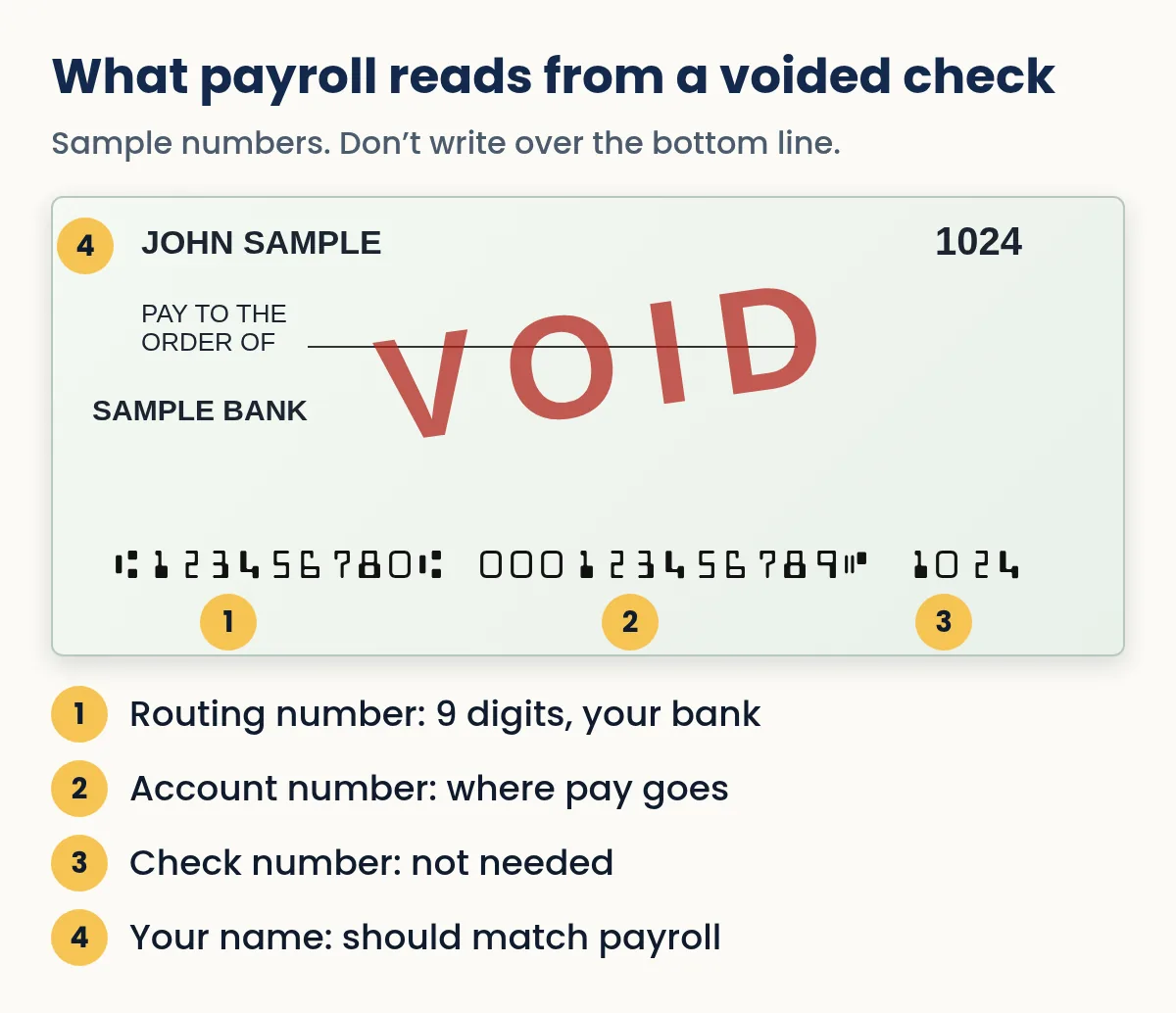
- A voided check is a blank check with VOID written across it; don’t cover the bottom line.
- No checks? Use your bank’s direct deposit form or a bank letter.
- Banks must make electronic payments available by the next business day after receipt.
On this page
- What direct deposit is
- What you need to set it up
- How to set up direct deposit with your employer
- The voided check: what it is and how to make one
- No checkbook? Your alternatives
- Direct deposit for government payments and tax refunds
- Is direct deposit required?
- How the rules vary by state
- How you'll know the money arrived
- Payroll cards and prepaid cards
- Protect your direct deposit from scammers
- Social Security and other federal benefits
- Checklist before you hand over your details
- Common problems and how to fix them
- Direct deposit vs a paper paycheck
- FAQ
What direct deposit is
Direct deposit is an electronic payment that puts money straight into your bank account instead of handing you a paper check. Paychecks, tax refunds, Social Security and other benefits, pension payments and many reimbursements arrive this way.
Behind the scenes, most direct deposits travel over the ACH network, the U.S. system for batch electronic payments. Nacha, the organization that governs the network, describes it as the system that delivers direct deposits, such as pay and tax refunds, as ACH credits. Your employer's payroll provider sends a file of payments to its bank; the ACH network routes each one to the right bank using your routing number; your bank credits your account using your account number.
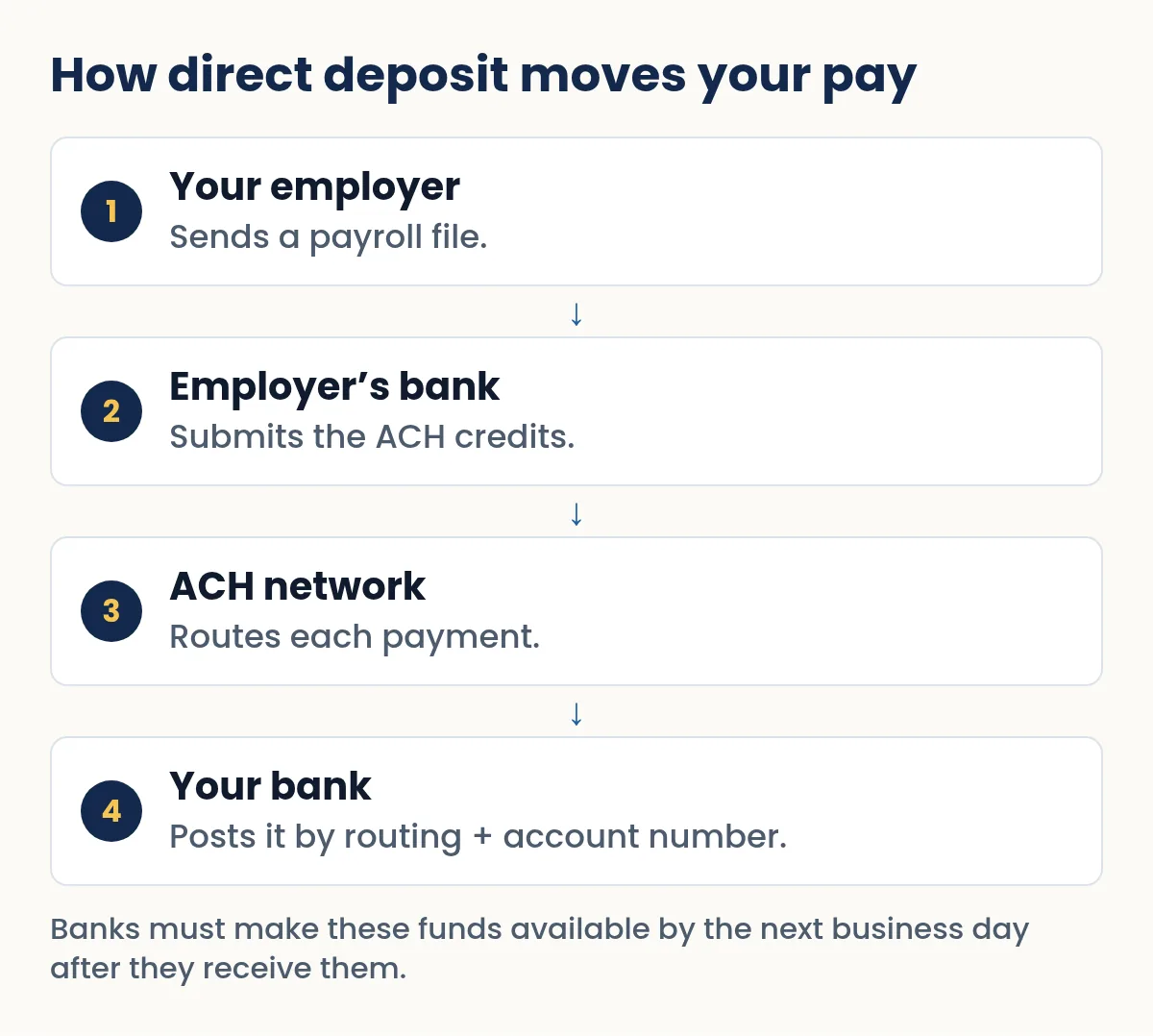
For you, the main advantages are speed, safety and predictability. Federal Regulation CC requires banks to make electronic payments available by the next business day after the bank receives them, and there is no paper check to lose, steal, or carry to a branch.
What you need to set it up
- Your bank's routing number
- The nine-digit number that identifies your bank. On a check it is the first group of numbers on the bottom line. See where to find the routing and account number.
- Your account number
- The number of the specific checking or savings account that should receive the money.
- The account type
- Checking or savings. Getting this wrong is a common reason a first deposit fails.
- Proof of the numbers, sometimes
- A voided check, your bank's direct deposit form, or a bank letter. Some employers ask for one so they aren't relying on typed numbers alone.
Some banks list a different routing number for wires, and occasionally for electronic payments, than the one printed on older checks. If your bank's website or app lists a routing number for direct deposit, use that one.
How to set up direct deposit with your employer
- Get the form or portal
Ask HR or payroll for the direct deposit form, or log in to the payroll site and find the direct deposit or banking section.
- Enter your details
Routing number, account number, account type, and the name on the account. Type carefully and check every digit twice.
- Decide on splits
Many employers let you divide pay between accounts, for example a fixed amount to savings and the rest to checking.
- Attach proof if asked
A voided check or your bank's form. See the next section.
- Watch your first payday
The first deposit can take one or two pay cycles to start; you may get a paper check meanwhile. Some employers send a small test deposit first.
- Keep your employer updated
If you change banks, update payroll before you close the old account.
The voided check: what it is and how to make one
A voided check is a real check from your account with “VOID” written across it so nobody can use it for payment. Employers and billers ask for one because it shows your routing number, account number and account holder name exactly as the bank printed them.
- Take a blank check
Use the next check in your checkbook, or print one from your own account.
- Write VOID in large letters
Use a pen, across the front, big enough to cover the payee, amount and signature areas. Don't cover the bottom line of numbers; that's the part they need.
- Don't sign it
There's no reason to put a signature on a check you're voiding.
- Record it
Note the check number as void in your register so you don't wonder later where it went.
Our full guide on how to void a check covers other reasons to void one.
Need to write a check right now?
Quick Check Writer fills in the amount in words, adds the bank line and prints on blank check stock or saves a PDF. Your first check is free, with no account and no card.
Write your first check free →No checkbook? Your alternatives
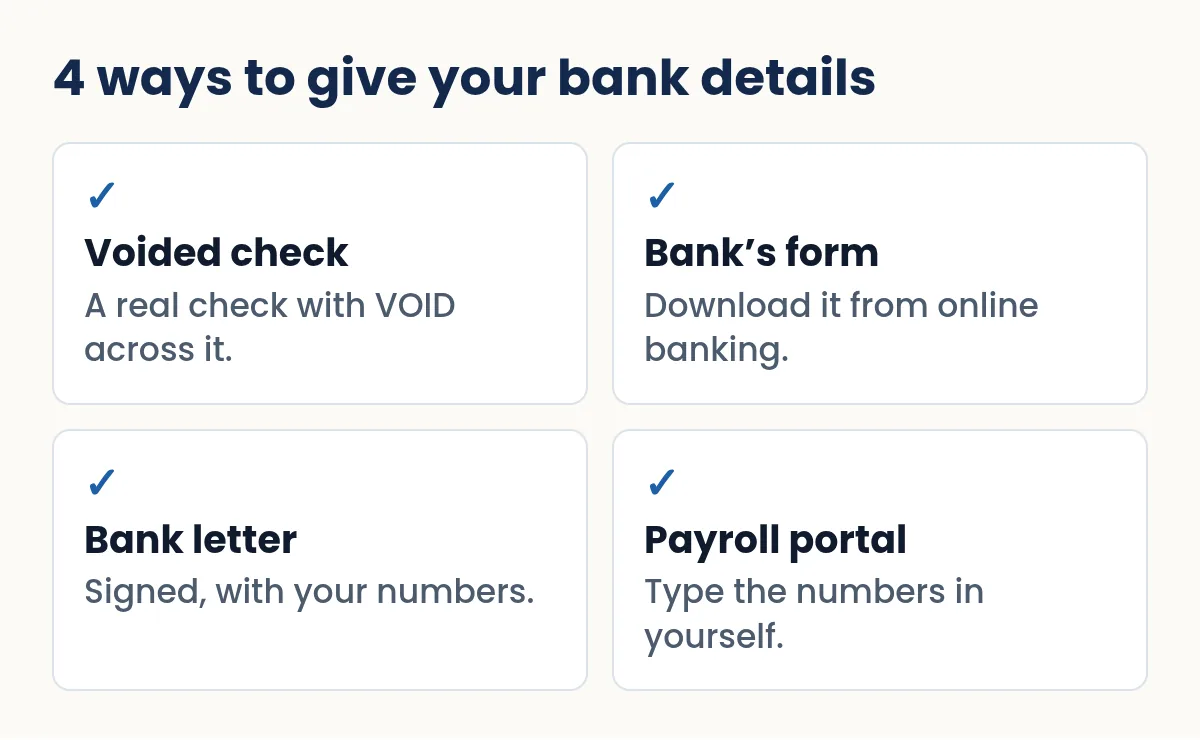
Plenty of people don't own paper checks anymore. Many banks let you download a direct deposit form from online banking or the app, already filled in with your routing and account numbers. A branch can also give you a signed letter confirming your account details. And many employers simply have you type the numbers into their payroll portal.
If you print your own checks, you can print one check on blank stock with your account's bank line and write VOID across it, the same as a check from a book. Quick Check Writer prints the routing and account numbers in the standard MICR position, so the check shows them exactly where payroll staff expect to find them. See how to write a check without a checkbook.
Direct deposit for government payments and tax refunds
The federal government has moved almost entirely to electronic payments. Under Executive Order 14247, the Treasury Department set September 30, 2025 as the date to stop issuing paper checks for federal payments, with limited exceptions, and agencies must enroll recipients in electronic payments. The IRS says this includes phasing out paper tax refund checks.
For tax refunds, the IRS lets you direct deposit your refund into one, two or three accounts. Tax software can do the split electronically, or you can use Form 8888 with a paper return. The IRS says refunds should go only to accounts in your own name, your spouse's name, or both if it's a joint account, and that no more than three electronic refunds can be deposited into a single account or prepaid card.
Is direct deposit required?
Not by federal law as a condition of a particular bank. Regulation E says no one may require you to open an account at a particular financial institution to receive electronic payments as a condition of employment or of receiving a government benefit. Whether an employer can require direct deposit at a bank of your choosing, or must offer a paper check or payroll card, depends on state law, so check your state's labor department if it matters to you.
How the rules vary by state
Federal law stops anyone from forcing you to use a particular bank. Whether an employer can insist on direct deposit at all is mostly a state question, and states differ. Two examples:
| New York | California | |
|---|---|---|
| Consent needed? | Yes, in writing, and you get a copy | Yes, your authorization must be voluntary |
| Can it be a condition of hire? | No | Deposits need your voluntary authorization |
| Changing your mind | Withdraw anytime; the switch must be done within two pay periods | Ask your employer and check the state labor agency |
If you work elsewhere, your state labor department's website is the place to check. The rules for payroll cards are often separate from the rules for bank-account deposits.
How you'll know the money arrived
When the same payer deposits money to your account at least once every 60 days, Regulation E requires your bank to keep you informed in one of three ways: a notice within two business days that the deposit arrived, a notice when an expected deposit didn't arrive, or a phone line you can call to check, with the number on your statements. In practice most people just see it in their banking app, but the phone line is there if you need it.
Some payroll systems send a zero-dollar test entry, called a prenote, before the first real deposit. Under the ACH network's rules a prenote is one accepted way to confirm an account is open and can receive entries.
Payroll cards and prepaid cards
If you don't have a bank account, some employers offer a payroll card: a prepaid card your wages are loaded onto each payday. Federal Regulation E covers payroll card accounts, and the required fee disclosures must include a statement that you don't have to accept the payroll card and should ask your employer about other ways to receive your wages. Many prepaid cards also accept direct deposit using a routing and account number the card provider gives you. Compare fees carefully: ATM withdrawals, balance checks and inactivity can all cost money.
Protect your direct deposit from scammers
Because direct deposit details control where your pay goes, criminals target them. The FBI's Internet Crime Complaint Center has warned about “payroll diversion”, where HR or payroll receives a spoofed email that appears to come from an employee asking to change their direct deposit account. A few habits help:
- Employees: change your bank details only through the official payroll portal or in person, and never through a link in an email or text.
- Employers: confirm any request to change direct deposit details by calling the employee at a number already on file, not one in the request.
- Everyone: treat a voided check or bank letter like sensitive data. Send it only to the payroll contact you know, and don't post it or email it widely.
Social Security and other federal benefits
Federal benefits are paid electronically. For Social Security, you can set up or change direct deposit through your personal my Social Security account online, or by calling Social Security at 1-800-772-1213 (TTY 1-800-325-0778). If you don't have a bank account, the Treasury's Direct Express card lets you receive federal benefits on a prepaid debit card, with no credit check and no minimum balance.
Jane Doe starts a new job on November 3. Payroll asks for direct deposit details, and she wants $100 of each paycheck to go to savings.
- She logs in to online banking and downloads her bank's direct deposit form, which lists her routing number and both account numbers.
- In the payroll portal she enters savings first, for a fixed $100, and checking for the remainder.
- She marks each account as checking or savings correctly.
- Her first payday arrives as a paper check because setup takes a pay cycle; the second lands in both accounts.
- She compares her pay stub with both deposits to confirm the split.
Her coworker John Sample has no form handy, so he writes VOID across one of his own checks and hands it over instead.
Checklist before you hand over your details
- Copy the numbers from the source. Use your bank's form or a check, not memory.
- Use the right routing number. If your bank shows more than one, use the one it lists for direct deposit, not the one for wires.
- Pick the right account type. Checking and savings aren't interchangeable.
- Keep the old account open until a deposit has landed in the new one.
- Confirm change requests in person or by phone. Payroll-diversion scams start with an email asking to “update” your bank.
- Check your first two pay stubs against your account.
Common problems and how to fix them
| Problem | Likely cause | Fix |
|---|---|---|
| First deposit didn't arrive | Setup takes a pay cycle, or a typo | Ask payroll whether it was sent and to which numbers |
| Deposit returned to employer | Wrong account number or closed account | Give corrected details; employer re-sends or pays by check |
| Money went to the old account | Payroll not updated before switching banks | Contact the old bank and payroll right away |
| Wrong account type | Savings entered as checking or vice versa | Correct it with payroll; the bank may return the deposit |
Direct deposit vs a paper paycheck
| Direct deposit | Paper paycheck | |
|---|---|---|
| Arrives | In your account on payday | When you receive and deposit it |
| Funds availability | Next business day after the bank receives it, at the latest | Depends on how and when you deposit |
| Can be lost or stolen in the mail | No | Yes |
| Needs a bank account | Yes (or a payroll card) | No, it can be cashed |
If you're the one paying people and still use checks, see how to print payroll checks. Quick Check Writer prints the checks; it doesn't run direct deposit, ACH or payroll. For the trade-offs between the two, read ACH vs check.
Frequently asked questions
Why do employers ask for a voided check?
It shows your routing number, account number and name exactly as your bank printed them, which reduces typing mistakes when payroll sets up your direct deposit.
Can I set up direct deposit without a voided check?
Yes. Most employers also accept your bank’s direct deposit form, a bank letter, or details typed into their payroll portal.
How long does direct deposit take to start?
Often one or two pay cycles. Until it starts, your employer may pay you by paper check.
Can I split my direct deposit between accounts?
Many employers allow it. For federal tax refunds, the IRS lets you split a refund into up to three accounts using tax software or Form 8888.
Can my employer make me use a specific bank?
No. Regulation E says no one may require you to open an account at a particular institution to receive electronic payments as a condition of employment.
When is direct deposit money available?
Federal rules require banks to make electronic payments available no later than the business day after the bank receives them. Many banks post payroll on payday morning.
Can Quick Check Writer set up direct deposit?
No. Quick Check Writer prints checks. It doesn’t send direct deposits, ACH payments or run payroll, but you can print a check from your account and void it for an employer.
What time does direct deposit arrive?
It depends on when your employer sends the payroll file and when your bank posts it, so the time of day varies by bank. Federal rules require the money to be available by the next business day after your bank receives it.
What happens if direct deposit goes to a closed account?
The receiving bank generally sends it back to the payer, who will ask for new details or pay another way. For a tax refund, the IRS says that if the bank returns the funds, it generally mails a paper check to your address on file.
Can I get direct deposit without a bank account?
Often, yes. Many employers offer payroll cards, many prepaid cards accept direct deposit, and federal benefits can go to a Direct Express card.
How do I set up direct deposit for Social Security?
Use your personal my Social Security account online or call 1-800-772-1213. Have your routing number, account number and account type ready.
Related guides
- How to Void a Check
- Where to find the routing and account number on a check
- ACH vs check: which payment should you use?
- How to Print Payroll Checks
- Writing a check without a checkbook
- eCheck vs. Paper Check: What's the Difference?
Sources
- Nacha: How ACH payments work
- 12 CFR § 229.10(b), availability of electronic payments (Cornell LII)
- 12 CFR § 1005.10(e)(2), Regulation E compulsory use (Cornell LII)
- IRS: Direct deposit your refund to one, two, or three accounts
- IRS: Modernizing payments to and from America’s bank account
- Treasury: Implementation of Executive Orders on America’s bank account
- 12 CFR § 1005.18, prepaid and payroll card accounts (Cornell LII)
- FBI IC3: Business email compromise and payroll diversion (PSA, Sept 10, 2019)
- NY Department of Labor: Direct deposit for employees
- California DIR Labor Commissioner: Paydays, pay periods and final wages FAQ (Labor Code § 213(d))
- 12 CFR § 1005.10(a), notice of preauthorized deposits (Cornell LII)
- Nacha: Account validation FAQs (prenotification entries)
- Social Security Administration: Direct deposit
- Bureau of the Fiscal Service: Direct Express
Last updated November 1, 2026. This page is general information, not legal or financial advice. Quick Check Writer is check printing software; it is not a bank and does not move money.