
Key takeaways
- A signature can be made by hand or by device (UCC § 3-401).
- Best-looking option: a photo of your ink signature with the background removed.
- Typed styles are quick but won't match your bank's signature card.
- In Quick Check Writer signatures are saved on your device, not uploaded.
- Sign large or unusual checks by hand.
On this page
- Is a printed signature valid on a check?
- What the law adds: agents, forgeries and your statement
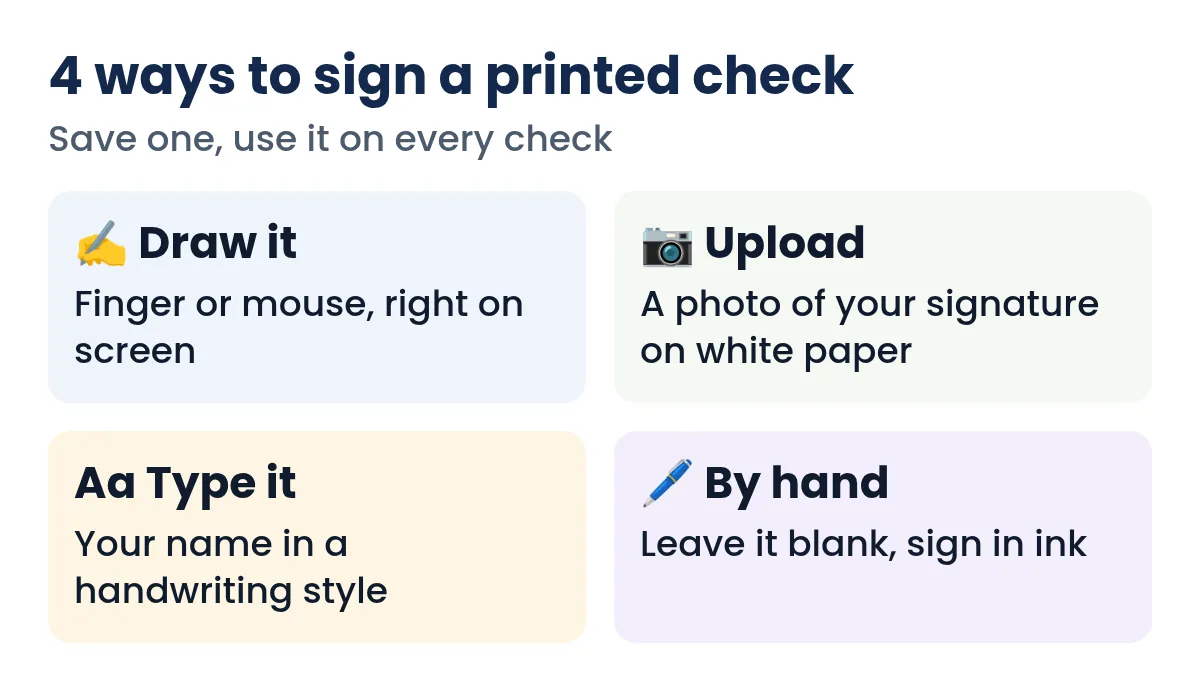
- Your four options
- How to add a signature in Quick Check Writer
- Getting a clean signature photo
- Where the signature goes on the check
- Signatures on pre-printed checks and PDFs
- Which approach fits your situation
- Two signers, or checks over a limit
- Keeping a stored signature safe
- Common signature mistakes
- When to sign by hand instead
- FAQ
Is a printed signature valid on a check?
Yes. The Uniform Commercial Code, which governs checks in every state, says a signature may be made manually or by means of a device or machine, and may be any name, word, mark or symbol a person adopts with the intention of authenticating a writing (UCC § 3-401). A signature you drew on a screen, photographed or chose from a handwriting font and then printed is a signature in that sense, as long as you, the account holder or an authorized signer, adopted it to sign that check.
Two practical caveats sit on top of the law:
- Your bank agreement. Many deposit agreements, especially for business accounts, include terms about facsimile (printed or stamped) signatures. Some banks ask businesses to sign a facsimile-signature agreement or resolution. Rules vary by bank, so if you're printing signatures on business checks, ask your bank what it needs.
- Your own controls. A stored signature makes it easier for anyone with access to your device to produce a signed check. Protect the device, and for business accounts decide who may print signed checks.
What the law adds: agents, forgeries and your statement
Three more rules from the Uniform Commercial Code explain why a printed signature works, and where its limits are.
- Signing for someone else
- When an authorized representative signs, for example an office manager signing for a company, the company is bound as if it had signed itself (UCC § 3-402). On business checks the company name usually prints above the line and the person signs as its authorized signer.
- Unauthorized signatures
- A signature made without authority is generally ineffective as the account holder's signature, unless the account holder later ratifies it (UCC § 3-403). The same section says that when an organization requires more than one signature, its signature is unauthorized if one of the required signatures is missing.
- Your duty to read statements
- When your bank sends or makes available a statement, you must review it with reasonable promptness for signatures you didn't authorize and report them promptly (UCC § 4-406). If you don't discover and report an unauthorized signature within one year of the statement being made available, you lose the right to make the bank cover it.
A saved signature is only as safe as the device it lives on, and the statement you read every month is your backstop.
Your four options
1. Draw it on screen
Sign with your finger on a phone or tablet, with a stylus, or with a mouse or trackpad on a computer. Quick Check Writer's signature pad varies the line width with your speed and, on devices that support it, pen pressure, so the result looks like ink rather than a uniform line. It exports the signature at high resolution so it prints sharp at check size.
Good for: people with a touch screen or stylus. A mouse signature rarely looks natural, so use one of the other options if you only have a mouse.
2. Upload a photo of your signature
This gives the most authentic result, because it is your real ink signature. Sign a sheet of plain white paper with a dark pen, take a photo in good light, and upload it. You can then adjust the darkness (slide right if lines are faint, left if the paper shows) and turn on background removal so only the ink prints, not a grey rectangle of paper.
3. Type it in a handwriting style
Type your name and pick from several handwriting-style fonts. It's quick and consistent. Keep in mind that a typed-style signature won't look like the signature your bank has on file, which matters if a teller or a payee ever compares them. Many people use a typed signature for low-value or routine checks and sign important ones by hand.
4. Leave it blank and sign by hand
If you don't add a signature, the check prints with an empty signature line. Sign it with a pen after printing, as you would any check. This is the most conservative option and avoids storing a signature at all.
How to add a signature in Quick Check Writer
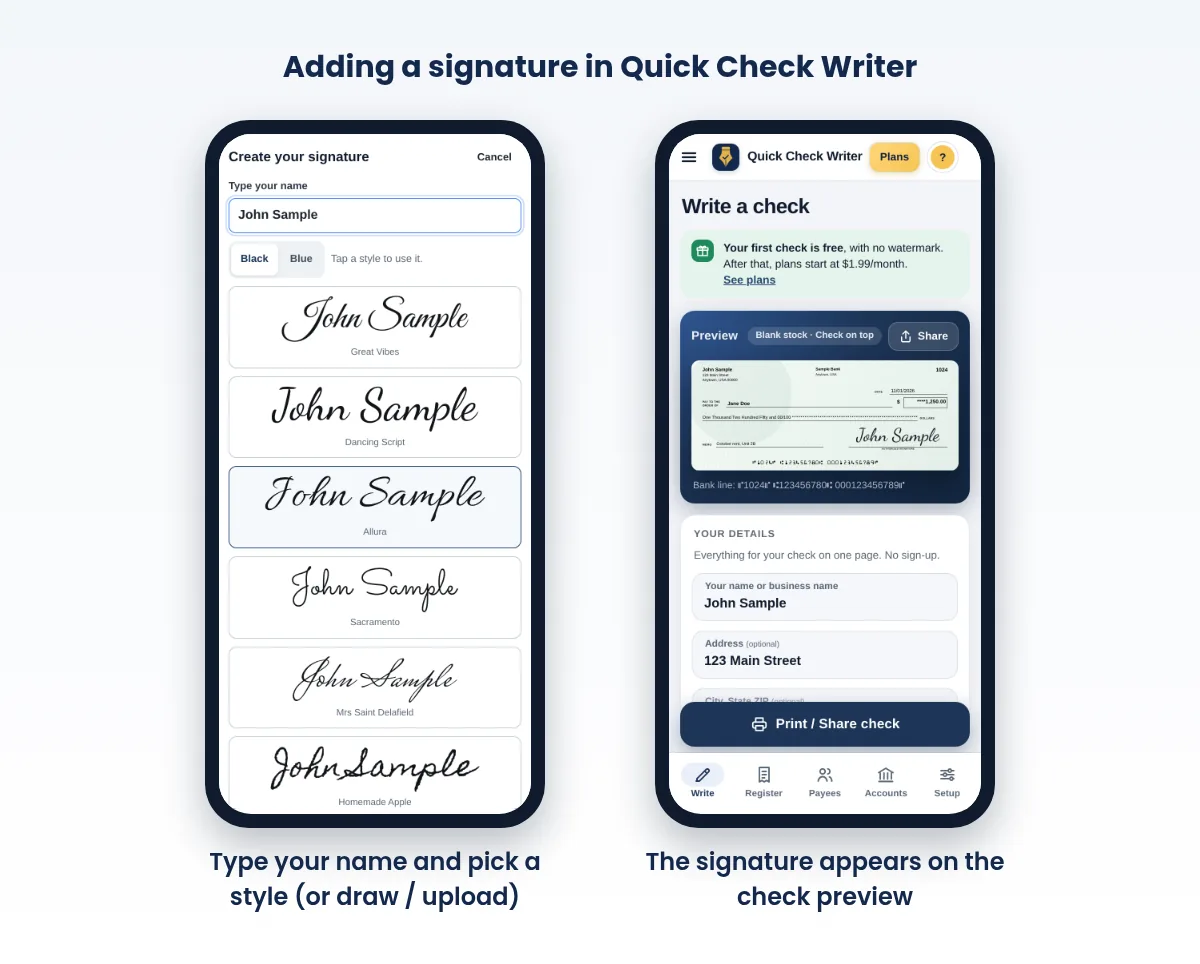
- Open the signature section
On the check form, find "Signature (optional)", or add one to a bank account under Setup so it's ready every time.
- Choose Draw, Upload photo or Type it
Draw with your finger, mouse or stylus; upload a photo from your camera or gallery; or type your name and pick a handwriting style.
- Clean it up
For photos, adjust the darkness and turn on "Remove the paper background". Check the preview: you should see crisp lines and no paper edge.
- Save it, or use it once
Save the signature with a name so you can pick it later, and choose whether it fills in automatically on new checks. Or use it for this check only, in which case it isn't kept.
- Preview and print
The signature appears on the check preview above the signature line. Print a test on plain paper before using your check stock.
Saved signatures stay in your browser on your device; they aren't uploaded to a server. You can save more than one signature per bank account (for example, two people who both sign on a business account) and pick the right one per check. If you reprint a check that used a one-time signature, the reprint comes out with a blank line so you can sign it by hand.
Need to write a check right now?
Quick Check Writer fills in the amount in words, adds the bank line and prints on blank check stock or saves a PDF. Your first check is free, with no account and no card.
Write your first check free →Getting a clean signature photo
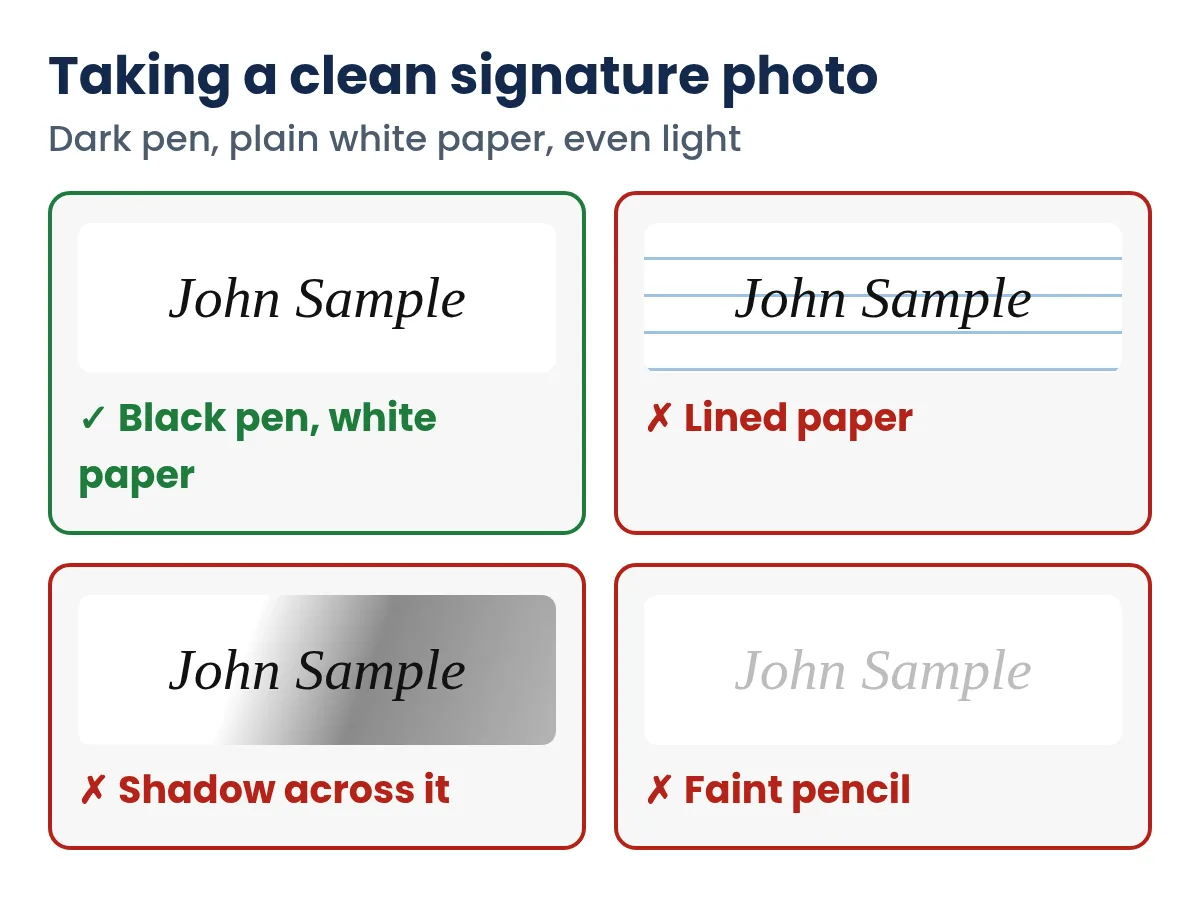
- Plain white paper. Lined or colored paper leaves marks that background removal can't fully remove.
- A dark, medium-tip pen. Black or dark blue gel or felt-tip pens photograph better than a fine ballpoint.
- Sign larger than usual. A signature about two to three inches wide keeps detail when it's scaled down.
- Even light, no shadow. Daylight from a window works well. Hold the phone directly above, not at an angle, so the signature isn't stretched.
- Crop close. Less paper around the signature means less to clean up.
Where the signature goes on the check
The signature prints above the line at the lower right of the check, which business layouts label "authorized signature." It should stay inside that area: not over the amount, and never down into the strip at the bottom where the bank's MICR line sits, because marks in that strip can interfere with machine reading. Quick Check Writer keeps the signature within its box and keeps the bottom strip clear. The signature line itself always prints in black, whatever check style you choose.
If your signature looks too small or too faint on paper, re-photograph it larger with a darker pen rather than stretching the image. Stretching makes lines blurry.
Signatures on pre-printed checks and PDFs
Checks you already have
If you print onto checks you bought from a supplier, Quick Check Writer's pre-printed mode prints only the details that change, such as the date, payee, amounts and memo, and the signature if you choose one. Alignment matters: print a test on plain paper and hold it over a real check so the signature lands on the line, not across the border of the box.
Checks shared as a PDF
When you save or share a check as a PDF, the signature you chose is part of the file. That's convenient when a payee prints the check themselves, but it also means the PDF is a signed check: send it only to the intended payee, through a channel you trust, and don't post it anywhere. Our guide on check PDFs covers how payees print and deposit them, and how to email a check covers the safety side.
Double-check the payee name and amount. A signed check file can be printed more than once, so ask the payee to confirm it was deposited and keep an eye on your account.
Which approach fits your situation
Personal account, routine bills
Save one signature and let it fill in automatically. A photo of your ink signature looks most natural; a typed style is fine for everyday bills. Keep the phone or computer locked.
Small business where one person prints and another signs
- Separate the jobs
Let the bookkeeper prepare and print checks with the signature line left blank.
- Review, then sign by hand
The owner checks each payee and amount against the invoice and signs in ink.
- Record it
The register keeps every printed check, so nothing goes out unlogged.
This costs a minute per check and means no single person can produce a finished, signed check alone.
Sole proprietor using a trade name
The UCC lets a signature be made with any name, including a trade or assumed name, when it's adopted to authenticate the writing (UCC § 3-401). Most owners still sign their own name under the business name, which is what the bank's signature card usually shows.
John Sample opens Quick Check Writer, types his name under Signature, and picks a handwriting style. He saves it as "John - everyday" and turns on auto-fill. He writes check 1024 to Jane Doe for $1,250.00, checks the preview (signature above the line, nothing over the amount or the bank line), prints a plain-paper test, then prints on stock. Next month he buys a used car: for that check he leaves the line blank and signs in ink at the seller's office.
Two signers, or checks over a limit
Some businesses require two signatures on checks above a set amount. Whether your bank actually checks for two signatures on every item varies, so treat it mainly as an internal control. With printed checks you can save both signers' signatures, or print one and have the second person sign by hand, which also proves the second person actually reviewed the check. Write the rule down so everyone follows it the same way.
Keeping a stored signature safe
- Lock the device with a passcode, fingerprint or face unlock, and don't share it.
- Don't email or text an image of your signature. Keep it in the app on your device.
- Remove signatures you no longer use, for example when a signer leaves the business.
- Back up carefully. A backup file can include your saved data; store it somewhere private.
- Watch your account. Review cleared checks in online banking and report anything you didn't write right away. See check fraud prevention.
Common signature mistakes
- Gray box around the signature. The paper background came along with the photo. Turn on background removal and crop tighter.
- Tiny or pixelated lines. The image was stretched. Re-take it larger, with a darker pen.
- Signature drifting into the bank line. Keep it above the signature line; the bottom strip is for the MICR numbers only.
- A style nothing like your real signature. It's legal, but a teller comparing it with your signature card may ask questions.
- A signature saved on a shared computer. Anyone using that browser can print a signed check.
- Signed checks sent as a PDF to someone you haven't verified. A signed PDF carries your account numbers and signature together.
When to sign by hand instead
A printed signature is convenient, but a wet-ink signature is still the safer choice for some checks:
- Large one-off payments, such as a vehicle or a security deposit.
- Checks to a payee or bank that has questioned a printed signature before.
- Any check where your bank agreement or your business's rules call for a manual signature.
You can mix both approaches: keep a saved signature for routine payments and leave the line blank for the rest. For everything else about filling in a check, see how to write a check, and if you're setting up checks for a company, how to print business checks.
Frequently asked questions
Can I print my signature on a check?
Yes. Under UCC § 3-401 a signature can be made by hand or by a device or machine. Check your bank agreement, especially for business accounts, in case your bank wants a facsimile-signature agreement.
Will a bank accept a check with a printed signature?
Printed signatures are common on business checks, and the UCC allows signatures made by a device or machine. If a check looks unusual the bank may contact you, so for important checks use a signature that resembles yours or sign by hand.
How do I put my signature on a check I print at home?
Draw it on screen, upload a photo of your ink signature, or type it in a handwriting style in your check software, then print. Or leave the line blank and sign with a pen.
Is it safe to save my signature in check software?
It's as safe as the device it's stored on. In Quick Check Writer saved signatures stay in your browser on your device and aren't uploaded. Lock your device and remove signatures you no longer need.
Why does my uploaded signature print with a gray box?
The photo includes the paper. Turn on background removal, adjust darkness, and crop close. Lined or shadowed paper is hard to clean, so re-take the photo on plain white paper in even light.
Can a check have two signatures?
Yes. You can print one signature and have a second person sign by hand, or save both signers' signatures. Whether your bank enforces a two-signature rule varies, so treat it as an internal control.
Does my signature have to match the one on file with my bank?
The law doesn't require an exact match, but a teller or the bank's review staff may compare it with your signature card, so a close match causes fewer questions. A photo of your ink signature is the closest you can get.
Can someone else sign a check for me?
Only if they are authorized. A representative's signature binds the account holder when it is authorized (UCC § 3-402); an unauthorized signature generally does not (UCC § 3-403). For a business, the bank's signer list says who may sign.
Do I have to sign a check in cursive?
No. A signature can be any name, word, mark or symbol you adopt to authenticate the check (UCC § 3-401). Printed letters or initials work, as long as they are what you use as your signature.
How long do I have to report a forged signature?
Review each statement promptly and report anything you did not sign right away. Under UCC § 4-406, if you do not report an unauthorized signature within one year after the statement was made available, you cannot make the bank cover it.
Related guides
- How to write a check, step by step
- How to Print Business Checks
- Custom checks with your logo
- Check fraud prevention for people and small businesses
- Is It Safe to Print Checks at Home?
- Check printing problems and fixes
Sources
- UCC § 3-401 Signature, Cornell LII
- UCC § 3-402 Signature by representative, Cornell LII
- UCC § 3-403 Unauthorized signature, Cornell LII
- UCC § 4-406 Customer duty to report unauthorized signature, Cornell LII
Last updated November 1, 2026. This page is general information, not legal or financial advice. Quick Check Writer is check printing software; it is not a bank and does not move money.