
Key takeaways
- Laser is the best all-round choice; inkjet is fine for occasional checks.
- A black-and-white printer is enough. The bank line must be black anyway.
- Make sure the printer handles 24 lb (about 90 g/m²) paper.
- MICR toner is only needed if your bank asks for it.
- Always run an alignment test on plain paper first.
On this page
- The short answer
- What a printer has to get right on a check
- Laser vs inkjet: an honest comparison
- Can you print checks on a black-and-white printer?
- Do you need a MICR printer or MICR toner?
- A buyer's checklist for a check printer
- Common mistakes when choosing a check printer
- Setting up your printer for the first sheet
- Which printer fits your situation?
- Working out the real cost per page
- Printing checks from a phone or tablet
- Common problems and quick fixes
- Keep the printer and stock secure
- FAQ
The short answer
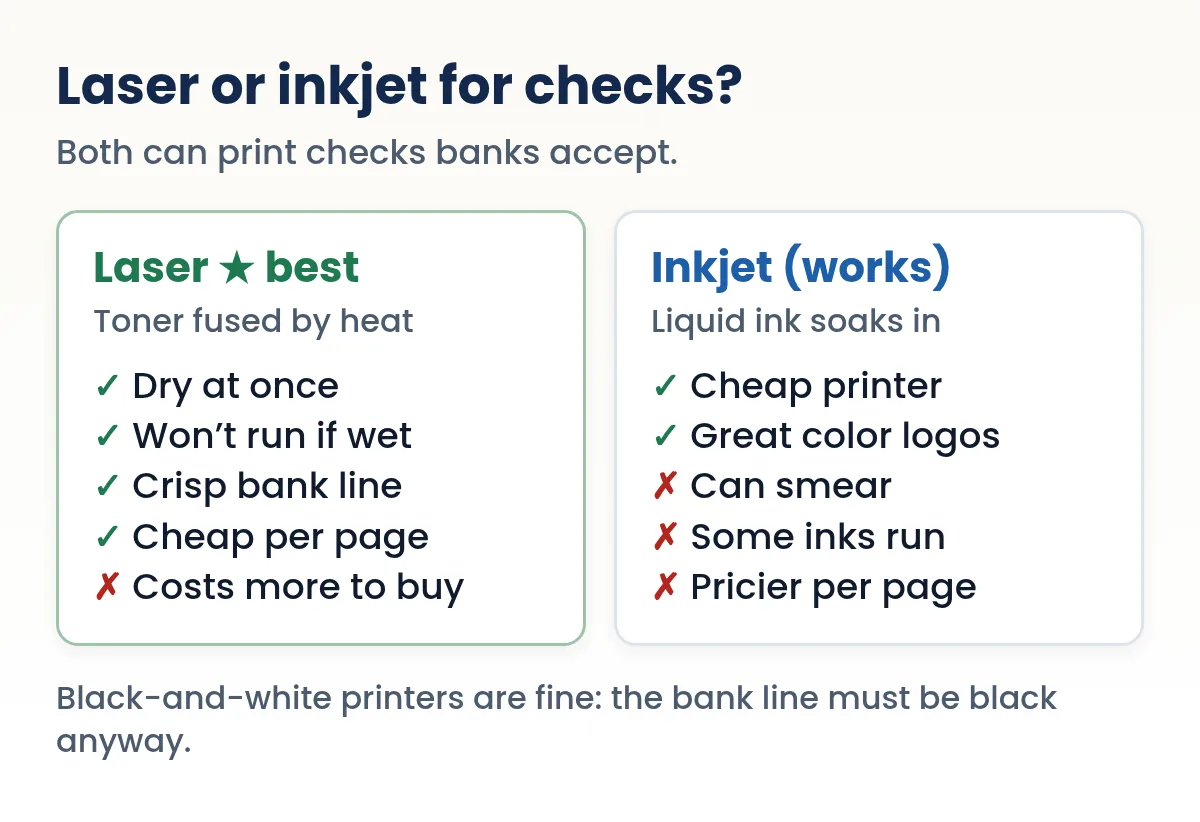
For most homes and small offices, the best check printer is an ordinary monochrome laser printer. Toner is fused into the paper with heat, so the bank line at the bottom of the check comes out sharp, dry and water-resistant, and the cost per page stays low for years.
An inkjet is a perfectly good second choice. If you already own one and print a handful of checks a month, start with it. You only need to give each sheet a moment to dry and keep an eye on print quality.
What you almost never need is a special "check printer." A check is a sheet of security paper with text printed in the right places. The printer's job is to put sharp black characters exactly where they belong, sheet after sheet. Many everyday printers can do that.
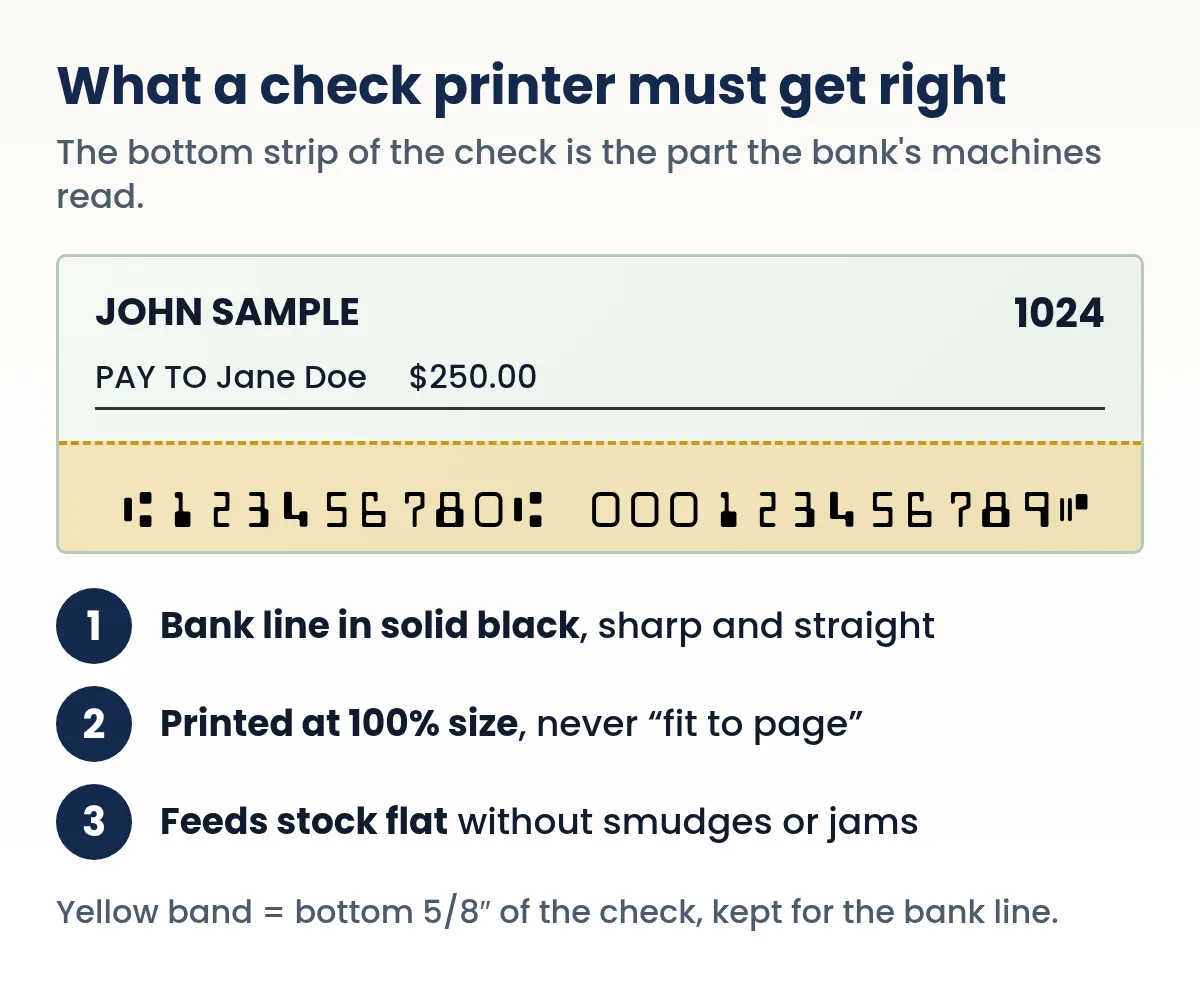
What a printer has to get right on a check
Banks don't care which brand you own. Their sorting and imaging equipment cares about the bottom of the check, where the routing number, account number and check number are printed in the E-13B font. That line is called the MICR line, and the industry standard that governs it is strict about a few things.
- The clear band
- The bottom 5/8 inch of the check is reserved for the bank line. Nothing else should print there, not your signature, a logo or a background pattern.
- Character spacing
- E-13B characters sit in 0.125-inch spaces, eight characters per inch. A printer that stretches or squeezes the page by even a little can throw the line off.
- Position
- Published summaries of the standard put the line about 5/16 inch in from the right edge and about 3/16 inch up from the bottom, with only about 1/16 inch of tolerance either way.
- Clean, solid characters
- Fuzzy edges, streaks, gaps or spatter can make a character unreadable. A good printer gives you crisp, solid black digits every time.
Everything else on the check, like the payee, date, amount and memo, is far more forgiving. If those land a millimeter off, nothing bad happens. That's why you choose a check printer for its consistency, not its color quality or speed. To see what each digit on the bank line means, read our guide to the MICR font and E-13B.
Laser vs inkjet: an honest comparison
| Laser | Inkjet | |
|---|---|---|
| How the image sticks | Toner is melted onto the paper | Liquid ink soaks into the fibers |
| Dry when it comes out | Yes | No (give it a minute) |
| Holds up if the check gets damp | Yes | Depends on the ink; some run |
| Magnetic (MICR) option | MICR toner is made for many models | Fewer MICR ink options |
| Cost of the printer | Higher | Lower |
| Cost per page over time | Usually lower | Usually higher |
| Color logos and check styles | Color laser only | Good |
| Best for | Regular check writing, business use | Occasional personal checks |
The cost line varies a lot by model, so before you buy, divide the price of a replacement cartridge by its rated page yield. That gives you a fair cost-per-page number to compare. Our guide to what it costs to print your own checks walks through the full math.
Why laser has the edge
The main reason is permanence. Fused toner bonds to the surface and doesn't smear when you fold the check, slide it into an envelope or handle it with damp hands. That also makes it harder for someone to lift or alter what you printed. Check-printing security papers are designed to work with this kind of print, and many sellers of blank check stock describe their paper as laser-compatible (look for inkjet compatibility on the label if you plan to use an inkjet).
When inkjet is the smarter buy
If you write five checks a year, a laser printer may be more machine than you need. A modern inkjet prints the bank line crisply when you use the black cartridge and a normal or high quality mode. It's also the cheaper way to print checks with a full-color logo. Just let the sheet dry before you tear the check off, and store checks flat.
Can you print checks on a black-and-white printer?
Yes, and it is often the best option. The bank line has to be printed in black anyway, and black is what a monochrome printer does best. Color only matters for decorative parts of the check, like a colored logo, a background style or a tinted border.
Blank check stock usually already has a printed security background, so the finished check still looks like a real check when you print only in black. If you want color on the check itself, print the logo in color on a color printer, or choose a simple one-color design that looks good in black.
Some color inkjets build black from cyan, magenta and yellow when the black cartridge is low or in certain photo modes. That can leave the bank line looking brownish or fuzzy. Keep the black cartridge full and print checks in a standard document mode, not a photo mode.
Do you need a MICR printer or MICR toner?
Usually not to get started. MICR toner and ink contain iron oxide, so a magnetic reader can recognize the characters by their signal. Regular toner looks the same but isn't magnetic. Most checks today are captured as images at some point, so many banks accept a correctly printed bank line in ordinary black toner, but policies differ.
The practical approach:
- Print a few checks with your normal toner and deposit or pay them as usual.
- If your bank ever returns a check or asks about the bank line, ask whether they require magnetic ink for your account.
- If you print many checks for a business, read your account agreement or ask your bank's business team before you start.
If you do need it, MICR toner is sold as a replacement cartridge for many laser printers, so you often don't need a new printer at all. We explain the details, including when it matters, in Do you need MICR ink to print checks?
Need to write a check right now?
Quick Check Writer fills in the amount in words, adds the bank line and prints on blank check stock or saves a PDF. Your first check is free, with no account and no card.
Write your first check free →A buyer's checklist for a check printer
If you're shopping, ignore the marketing and check these points on the spec sheet:
- Paper weight
Check stock is usually 24 lb bond, about 90 g/m². Make sure the printer lists that weight (or higher) as supported. Spec sheets often state paper weight in g/m².
- A manual or rear feed slot
A single-sheet slot or bypass tray lets you feed one check sheet at a time without loading the whole stack. It is handy for one-off checks and keeps blank stock out of the main tray.
- Resolution that keeps small text sharp
Most current laser printers handle fine text easily. Print a test page and look closely at the smallest characters. You want clean edges with no spatter.
- Affordable genuine or compatible cartridges
Look up the cartridge price and rated yield before you buy. A cheap printer with costly cartridges can cost more within a year.
- MICR toner availability (business users)
If your bank may require magnetic ink, search for MICR toner for the exact model first.
- Phone printing, if you want it
If you plan to print from a phone or tablet, choose a printer that supports AirPrint (iPhone and iPad) or the standard Android print service.
Things you can skip: photo features, duplex printing (checks are one-sided) and high page-per-minute speeds.
Common mistakes when choosing a check printer
- Buying a "check printer" bundle you don't need. A normal printer prints checks. Special hardware only matters if your bank requires magnetic ink, and then you usually just need a MICR toner cartridge for an ordinary laser model.
- Ignoring paper weight. Check stock is heavier than copy paper. If the printer's specs stop at lighter paper, expect jams and smudged toner.
- Forgetting where the printer lives. A printer in a shared hallway needs a plan for keeping stock and printed checks out of other hands.
- Skipping the test sheet. Every printer feeds a little differently. One plain-paper test saves a sheet of stock and a reprint.
Setting up your printer for the first sheet
A new printer, a new box of check stock or a new layout all deserve a quick alignment test. Printers feed paper slightly differently, and a few millimeters matters at the bottom of a check.
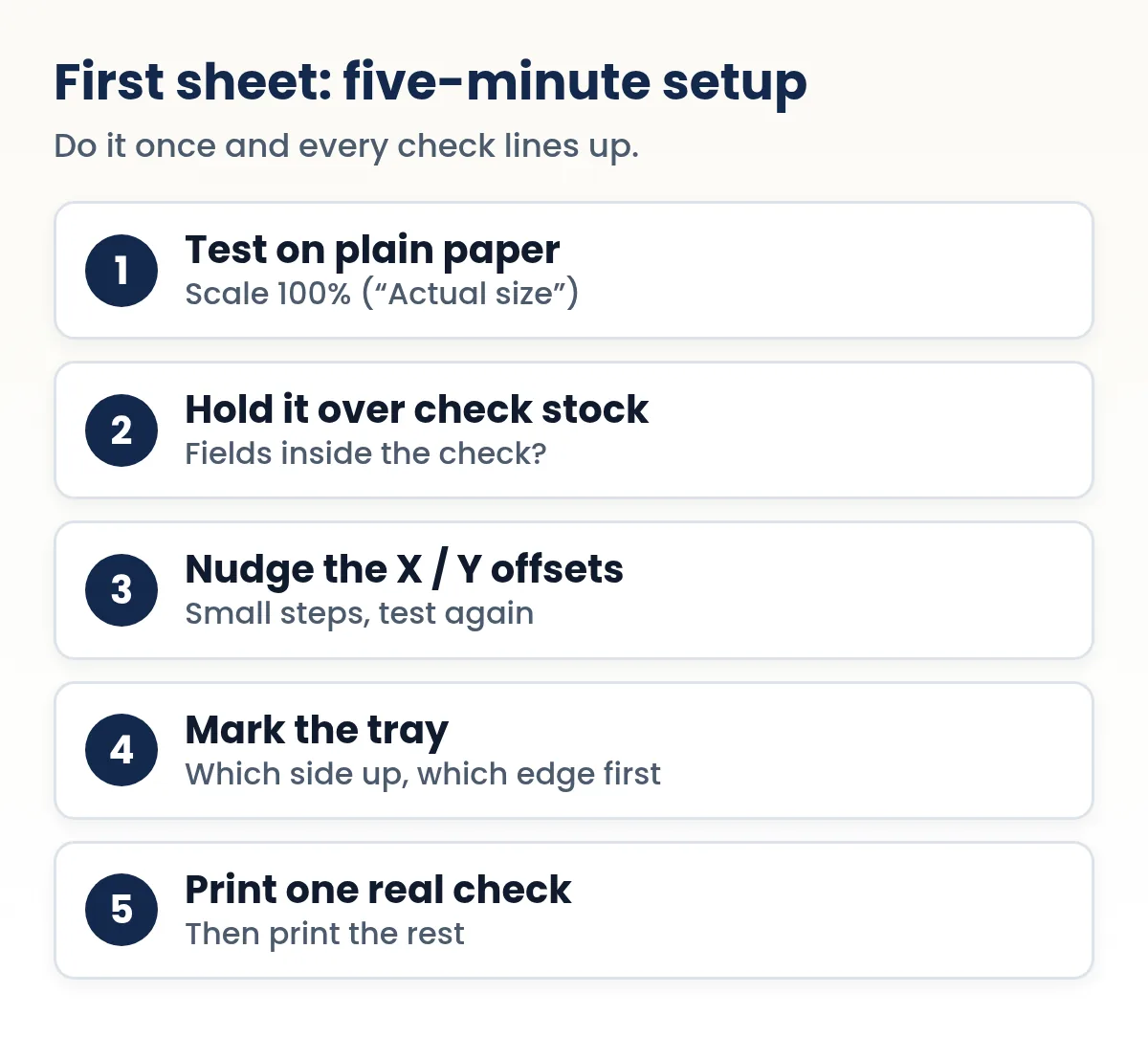
In Quick Check Writer, the alignment test page and the X/Y print offsets are in print setup, so you can shift everything in small steps and save the result. Pick a layout that matches your stock: the check on the top, middle or bottom of a letter sheet, or three checks per page. If you're not sure which stock you have, our blank check stock guide shows the common formats.
Before loading check stock, put a small pencil mark on one sheet of plain paper and run it through. See which side comes out printed and which edge went in first. Then load your check stock the same way.
Print settings that matter
- Scale: 100% / Actual size. "Fit to page" shrinks the layout and moves the bank line.
- Paper size: Letter (8.5 × 11 in) for standard check stock.
- Paper type: plain or "bond." If the toner rubs off, try the printer's "heavy" setting.
- Quality: standard or high. Avoid draft or economy modes on checks.
Which printer fits your situation?
The "best" printer depends less on brand and more on how many checks you print and where the printer sits. Three common cases:
At home, a few checks a month
John Sample pays rent, a babysitter and the occasional contractor by check: four or five a month. He already owns a color inkjet. That printer is enough. He prints in normal (not draft) quality, lets each sheet dry for a minute before folding it, and keeps a small pack of check stock in a drawer rather than in the tray. Buying a new printer only for checks would cost more than he will spend on checks in years.
A small business, one batch a week
A shop that pays 20 to 40 vendors every Friday benefits from a monochrome laser printer. Toner is dry the second the sheet comes out, so a batch can go straight into envelopes, and the cost per page is low. A second paper tray or a manual feed slot helps: keep plain paper in the main tray and load check stock only when it's time to print. If the bank asks for magnetic ink, this is the printer to buy a MICR toner cartridge for.
A shared office printer
Big office machines print checks well, but they are busy and public. Load stock by hand just before printing and collect every sheet yourself, or use a small personal laser at the bookkeeper's desk instead.
| Situation | Good choice | Watch out for |
|---|---|---|
| A few personal checks a month | The printer you already own | Wet ink; draft mode |
| Weekly business batch | Monochrome laser, second tray | Bank's MICR toner rules |
| Shared office machine | Secure / PIN-release printing | Stock left in trays |
| Printing from a phone | Any AirPrint or Wi-Fi printer | "Fit to page" scaling |
Working out the real cost per page
Printer makers publish a rated page yield for each cartridge. For monochrome laser toner the number comes from a standard test method, ISO/IEC 19752; for inkjet cartridges it comes from ISO/IEC 24711. That makes cartridges comparable with each other, though a check sheet uses more or less ink than the standard test page, so treat the yield as a guide, not a promise.
The math is simple: cartridge price ÷ rated pages = cost per page. As an example only, a $60 toner cartridge rated at 3,000 pages costs 2 cents a page, while a $25 ink cartridge rated at 250 pages costs 10 cents. Look up the real prices and yields for the printers you are comparing, and add the cost of check stock. Our guide to the cost of printing your own checks walks through a full example.
Printing checks from a phone or tablet
You don't need a computer. Quick Check Writer runs in the browser on a phone, and the phone hands the page to your printer through its normal print service. On an iPhone or iPad that's AirPrint: open the share menu, tap Print, choose the printer, and the job goes over Wi-Fi to any AirPrint-enabled printer. On Android, Chrome's menu has a Print option that sends the page to a printer set up on the phone, or saves it as a PDF.
If your printer isn't on the same Wi-Fi network, save the check as a PDF and print it later from any device. Our guide to printing checks from a PDF covers the settings that keep the size exact.
Common problems and quick fixes
| What you see | Likely cause | Fix |
|---|---|---|
| Bank line too high, low or off to one side | Feed offset differs by printer | Run the alignment test and adjust X/Y |
| Everything slightly smaller than expected | "Fit to page" scaling | Print at 100% / Actual size |
| Smudged digits | Inkjet ink still wet | Let the sheet dry; use the laser if you have one |
| Toner rubs off | Paper heavier than the setting | Choose a heavier paper type |
| Grey or brownish bank line | Low toner or composite black | Replace the black cartridge; use document mode |
| Sheets jam or skew | Thick stock in the main tray | Use the manual feed, fan the stack |
For more, see check printing problems and fixes.
Keep the printer and stock secure
A blank check sheet is valuable once your bank details are printed on it. Treat the printer area the way you'd treat a checkbook:
- Don't leave check stock sitting in a shared printer tray.
- On a shared office printer, use a "secure print" or PIN-release feature if it has one, so a check doesn't sit in the output tray.
- Shred misprints. Don't just throw them out.
- Keep a record of every check you print. Quick Check Writer logs each one in its check register automatically.
More on this in Is it safe to print checks at home?
Frequently asked questions
Can I print checks on any printer?
Most laser and inkjet printers that handle 24 lb paper can print checks. What matters is that the bank line prints in sharp black and in the right place, so run an alignment test before your first real check.
Is a laser or inkjet printer better for checks?
Laser is better for regular use because fused toner is dry, crisp and water-resistant. Inkjet works for occasional checks if you let the ink dry and print in a standard quality mode.
Can I print checks with a black-and-white printer?
Yes. The bank line must be printed in black, and the rest of the check looks fine in black on security check stock. Color is only needed for colored logos or styles.
Do I need a special MICR printer?
No. Any good printer can print the E-13B characters. Some banks prefer or require magnetic MICR toner, which is sold as a cartridge for many regular laser printers. Ask your bank if you're unsure.
What paper do I put in the printer?
Blank check stock, usually 24 lb letter-size sheets with the check at the top, middle or bottom, or three checks per page. Test on plain paper first and print the real check on stock.
Why is my check printing slightly too small?
The print dialog is probably set to fit the page. Choose 100% or Actual size so the layout keeps its exact measurements.
Can I print checks from my phone?
Yes. Write the check in the browser on your phone and print through AirPrint or the Android print service, or save it as a PDF and print it later.
Do banks accept checks printed on an inkjet printer?
Banks look at the check, not the printer: a clear, correctly placed bank line and readable payee, amount and signature. If your bank has a rule about magnetic ink, follow it; otherwise inkjet checks that are dry and sharp are processed like any other.
How do I print a check from my iPhone?
Write the check in your browser, open the share menu, tap Print and pick an AirPrint printer on the same Wi-Fi. Set the scale to 100% if the option appears. Or save the check as a PDF and print it later.
Does the printer need to be online to print checks?
No. A printer connected by USB or local Wi-Fi works. Quick Check Writer also keeps working without internet after your first visit, so you can write and print checks offline.
Related guides
- Do You Need MICR Ink to Print Checks?
- Blank Check Stock: A Complete Guide
- Check printing problems and fixes
- Check size and dimensions
- How much does it cost to print your own checks?
- How to print checks at home
Sources
- ASC X9 TR 100-2013, Organization of Check-related Payments Standards (glossary: MICR clear band 0.625 in; 0.125 in character space; 24 lb paper)
- X9Assist help: MICR line placement and check dimensions (summary of ANSI X9 MICR placement)
- Print from Chrome on Android (Google Chrome Help)
- Apple Support: Use AirPrint to print from your iPhone or iPad
- ISO/IEC 19752:2017, method for the determination of toner cartridge yield for monochromatic printers
- ISO/IEC 24711:2021, method for the determination of ink cartridge yield
- HP: Measuring yield, the ISO standard for toner cartridge yield
Last updated November 1, 2026. This page is general information, not legal or financial advice. Quick Check Writer is check printing software; it is not a bank and does not move money.