
Key takeaways
- Features either resist copying (counterfeits) or reveal changes (alterations).
- The padlock icon means at least three qualifying features, described on the back.
- Microprinting turns into dots or a solid line on a copy.
- Chemical-reactive paper is the main defense against check washing.
- When you print your own checks, the paper supplies most of the protection.
On this page
- Why checks carry security features at all
- The padlock icon
- Common security features, one by one
- Quick reference
- A real-world example: U.S. Treasury checks
- Security features when you print your own checks
- When you are the one receiving a check
- Security by check type
- "The funds are available" doesn't mean the check is good
- Mistakes that undo good security features
- What security features cannot do
- FAQ
Why checks carry security features at all
A check is a piece of paper that tells a bank to pay money. For most of history, the hard part of faking one was the printing. Then desktop computers, scanners and color laser printers made it easy to produce a convincing copy. The check-printing industry responded by building protections into the design, the inks and the paper itself.
The trade group for check printers, the Check Payments Systems Association, says this directly: the evolution of printing technology let fraudsters "manufacture" checks with computers and copiers, so the industry added features that make a check harder to change or reproduce. Those features give anyone accepting a check a way to judge whether it is genuine.
Every feature does one of two jobs. Anti-counterfeiting features are hard to copy, so a fake looks or behaves differently. Anti-alteration features react or show damage when someone tries to change what is written on a real check. Good checks combine both.
The padlock icon
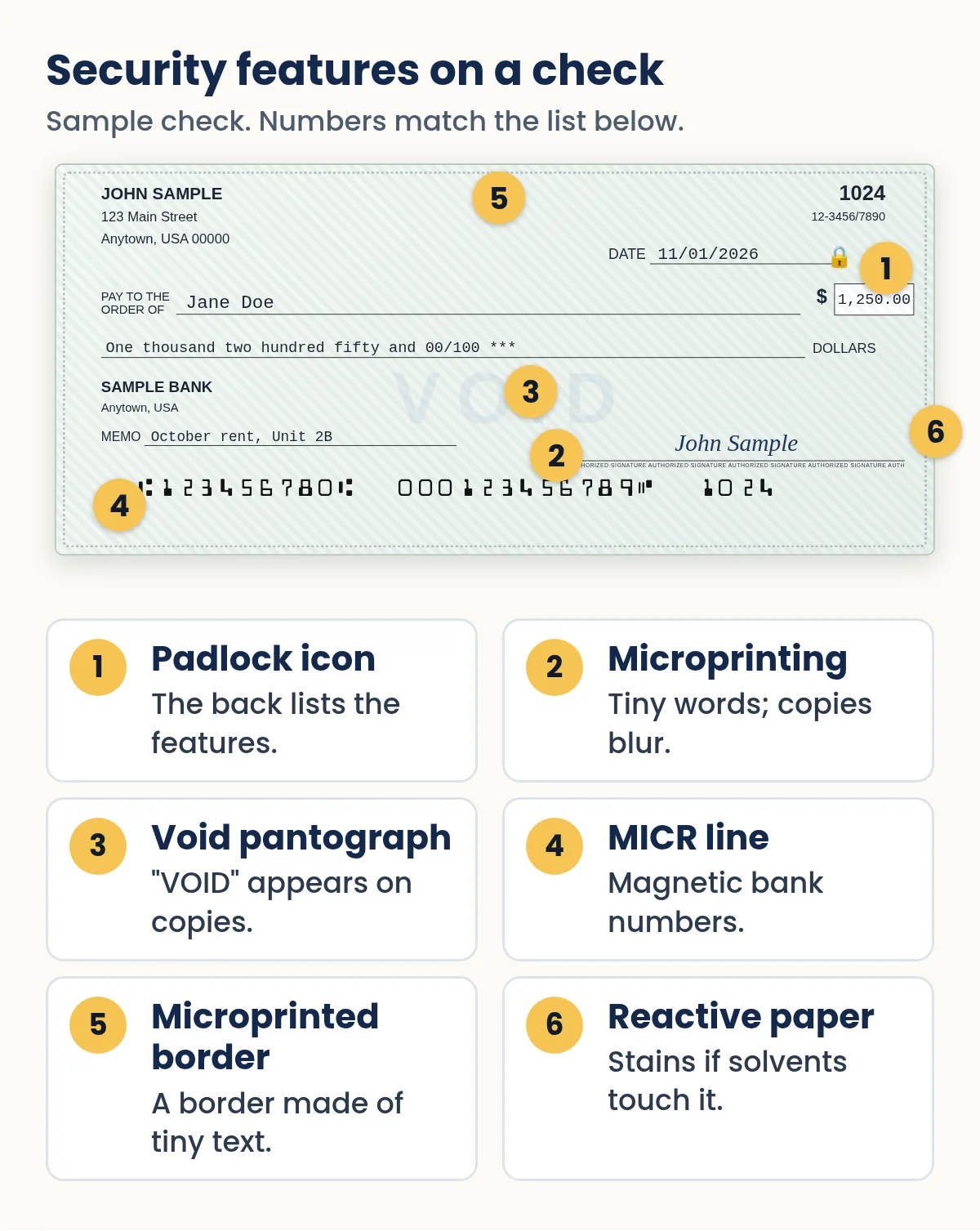
The small padlock symbol you see near the amount on many checks is a registered certification mark of the Check Payments Systems Association. It signals that the check includes enhanced security features and that those features are described on the back.
To use the icon, a check printer must include at least three qualifying features that defend against alteration and counterfeiting. Only features you can see, or that are disclosed on the check itself, count. The padlock on the front plus its description and warning box on the back counts as one of the three, so at least two more must be present.
The padlock does not guarantee a check is real. The association itself notes that security features give the recipient a chance to spot counterfeiting or alteration; they do not prove the person or the document is legitimate.
Common security features, one by one
Microprinting
Microprinting is text so small it looks like a plain line to the naked eye. The industry guideline describes letters less than 0.010 inch tall, readable with a magnifying glass. The preferred spot is the signature line; the border is the next choice. On the back, microprinting often forms the line that separates the payee's endorsement area from the area used by banks. A copier or scanner usually cannot reproduce text that small, so on a copy it turns into a broken or solid line.
Security screen on the back
A very light background pattern, often with reversed text, printed using low-density screens and "dropout" inks. Many copiers and scanners do not pick it up, so the back of a photocopied check looks noticeably different from the original.
Void pantograph
A background pattern built from two dot or line sizes. To the eye it looks like an even tint. When the check is photocopied, one size reproduces and the other drops out, so a hidden word such as "VOID" or "COPY" appears on the copy.
Watermark
A true watermark is formed in the paper while it is being made and can be seen from both sides when the check is held to light. U.S. Treasury checks, for example, are printed on paper watermarked "U.S. TREASURY," and the Treasury notes the watermark cannot be reproduced by a copier. Some check stocks use an "artificial" watermark printed on the back, which is visible at an angle; it is a weaker protection than a true watermark but still hard to copy.
Chemical-reactive paper
Paper treated so that common solvents and bleaches cause stains, spots or a visible word to appear. It is aimed squarely at check washing, where a criminal dissolves the ink to change the payee or amount. Treasury checks use a related idea: the ink in the seal runs and turns red when moisture touches it.
Ultraviolet features
Fibers, patterns or ink that are invisible in normal light but glow under a black light. The Treasury's checks carry an ultraviolet pattern beneath the payee and amount areas; if the amount area is scraped or altered, a gap shows up in the glowing pattern.
Warning box and feature list
A printed box on the back that lists the security features on the check and tells the recipient what to look for. It is cheap to print but useful: a teller or a landlord can confirm the listed features are actually there.
Account number under the fractional routing number
Some checks print the account number again near the small fraction-style routing code at the top. If the magnetic line at the bottom has been altered, a mismatch with this printed number can reveal it.
Toner anchorage (for laser-printed checks)
Check stock designed for laser printers often has a coating that helps toner grip the paper, so printed amounts and names are harder to scrape or lift off cleanly.
The MICR line
The row of special numbers along the bottom (routing number, account number and check number) is printed in the E-13B font so bank equipment can read it. It is mainly about automated processing rather than fraud prevention, but a correctly printed MICR line is part of what makes a check acceptable. Read more in our guides to the MICR font and whether you need MICR ink.
Quick reference
| Feature | Fights | How to check it |
|---|---|---|
| Padlock icon | Both (signals features) | Find the feature list on the back and confirm each item |
| Microprinting | Counterfeiting | Magnifying glass on signature line or border |
| Void pantograph | Counterfeiting | Visible on copies, not on the original |
| Security screen (back) | Counterfeiting | Faint pattern present on the original's back |
| True watermark | Counterfeiting | Hold to light; visible from both sides |
| Chemical-reactive paper | Alteration | Stains or marks near the payee or amount |
| UV fibers or ink | Both | Black light |
| Toner anchorage | Alteration | Printed text does not flake or scrape off easily |
A real-world example: U.S. Treasury checks
Government checks are a good illustration because the Bureau of the Fiscal Service publishes their features. A Treasury check combines:
- a watermark reading "U.S. TREASURY" visible from both sides;
- microprinting in three areas that turns into dots or a solid line when copied;
- a Treasury seal printed in ink that runs and turns red when wet;
- an ultraviolet pattern that glows under black light and shows a gap if the amount area is altered.
The Treasury also runs an online Treasury Check Verification System for checking a government check's issue information, which is a reminder that the strongest test is always confirmation from the issuer.
Need to write a check right now?
Quick Check Writer fills in the amount in words, adds the bank line and prints on blank check stock or saves a PDF. Your first check is free, with no account and no card.
Write your first check free →Security features when you print your own checks
If you print checks at home or in the office, most physical protections come from the paper, not from your printer. That is why the choice of blank stock matters. When you shop, look at the package for the list of features (microprinted border, void pantograph, chemical protection, a padlock icon and warning box on the back, a watermark), and pick stock made for your printer type. Our blank check stock guide explains what to look for.
The way you print adds a second layer:
- Printed amounts are harder to "fix." A printed payee and an amount written out in words leave no handwriting for someone to imitate and no gaps to extend.
- Fill the lines. Asterisks or a line after the amount in words prevent additions.
- Add a "void after" line. A printed note such as "Void after 90 days" tells the recipient to deposit promptly. Note that banks are not required to pay checks more than six months old under UCC § 4-404, though they may.
- Keep a record of every check. A register lets you prove what you actually wrote if a copy or alteration appears.
Quick Check Writer prints on your own blank stock and can add optional security marks, background patterns and a "Void after 90 days" line. Those printed touches help, but the strongest physical protections are the ones already built into good check paper, so use quality stock.
For more on doing this safely, see is it safe to print checks at home? and how to print checks at home.
When you are the one receiving a check
Security features are designed for the person accepting the check as much as for the person writing it. If you take checks as a landlord, a contractor or a small shop, a short routine helps:
- Know what a genuine check should have
Read the feature list in the warning box on the back. If the front shows a padlock but the back lists nothing, or the listed features are missing, treat it as a red flag.
- Test two or three features
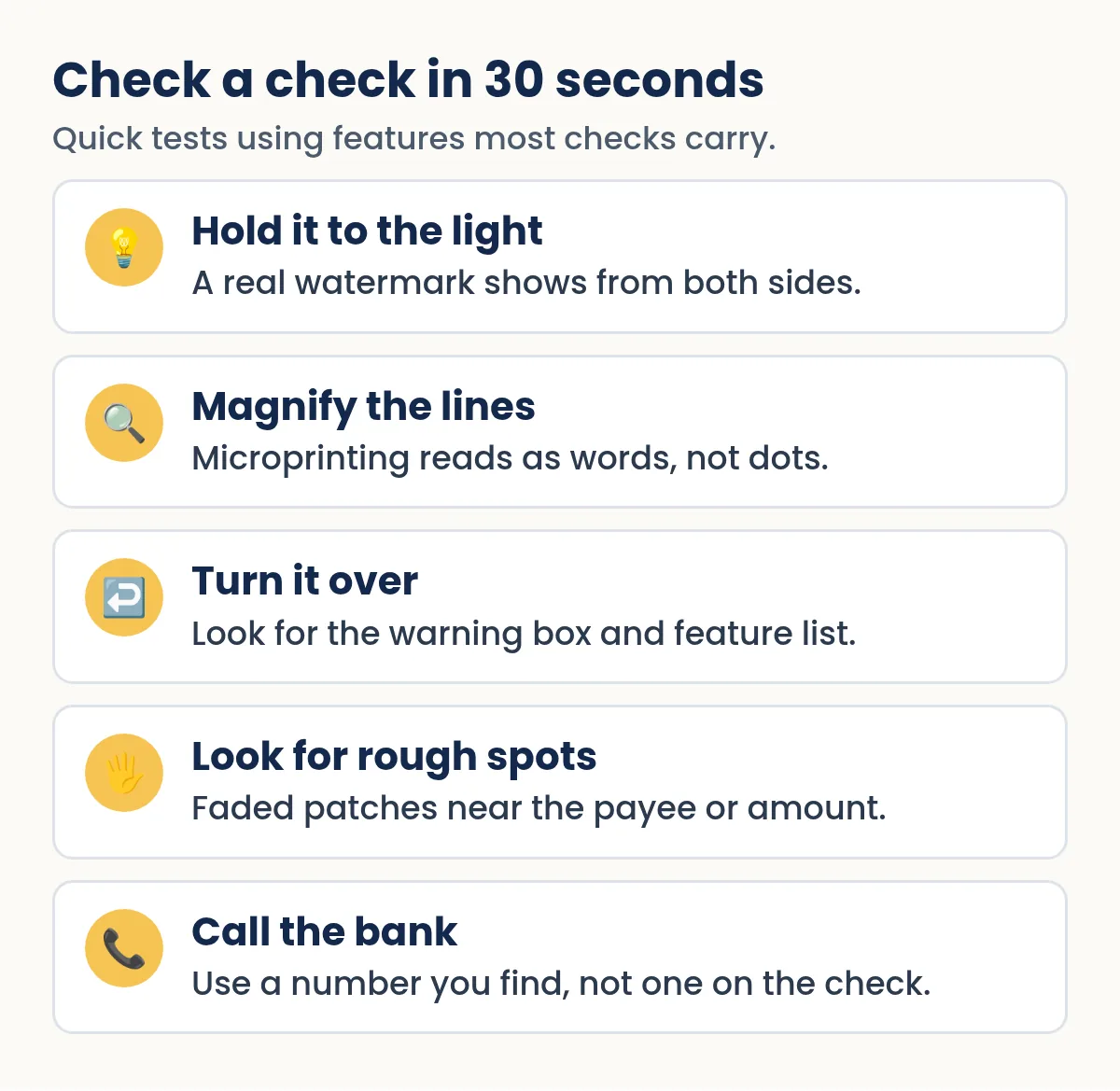
Hold it to the light, look at the signature line through a magnifier, and check for faded or rough areas around the payee and amount.
- Be wary of pressure and overpayment
A check for more than you are owed, with a request to send back the difference, is a classic scam regardless of how good the paper looks.
- Verify independently
Look up the issuing bank's phone number yourself rather than using the number printed on the check, and ask whether the check is valid. Our guide on how to verify a check walks through it.
Security by check type
Not every check you see carries the same protections. Here is what to expect, and what to do when it matters.
| Check type | What it usually carries | Best way to confirm it |
|---|---|---|
| Personal check | Varies by the stock the writer ordered or printed on | Know the person; wait for the check to clear before relying on it |
| Business check | Often more features: padlock, warning box, microprinting | Call the business or its bank using a number you look up |
| Cashier's check | Bank-grade stock, but heavily counterfeited | Call the issuing bank yourself; ask if that check number is valid |
| U.S. Treasury check | Published features: watermark, seal ink, UV pattern | The Treasury's online check verification system |
"The funds are available" doesn't mean the check is good
This is the single most misunderstood fact about checks. Federal funds availability rules (Regulation CC) require banks to make deposited money available quickly; for example, generally the first $275 of a check deposit by the next business day. But making funds available is not the same as confirming the check is genuine.
The federal banking regulator for national banks, the OCC, warns that it may take weeks to discover that a cashier's check is fraudulent, and that a consumer who has already spent or wired the money can end up owing the bank the full amount. If a check you deposited turns out to be fake, the bank can generally reverse the credit.
Jane Doe sells a used car online. The buyer sends a cashier's check for $1,000 more than the price and asks her to send the extra back. The check has a padlock, microprinting and a watermark, and her bank makes the funds available two days later. Ten days after that, the check is returned as counterfeit. Because she followed the safer route, calling the issuing bank at a number she found on its official website before shipping anything, she learned the check number didn't exist and never sent a cent.
Mistakes that undo good security features
- Leaving blank check stock unlocked. The best features don't help if someone can print a real-looking check on your own paper. Lock it up and count it.
- Using plain paper "just this once." A check printed on copy paper has none of the paper-based protections, and some banks may refuse it.
- Emailing photos of signed checks. An image of a real check gives a counterfeiter your numbers, your signature and your layout.
- Ignoring the warning box. If you accept checks, actually read it and test one or two listed features.
- Relying on looks alone. A perfect-looking check can still be fake. Verify with the issuer for anything large or unusual.
What security features cannot do
Most checks are processed as images by machines, so a person may never physically handle your check after it leaves your hands. Paper features help when someone does look closely, such as a teller, a business owner or you. They do not stop a criminal who has your account number from printing a fake on plain paper and depositing it by phone. That kind of fraud is caught by account monitoring, reconciliation and bank services like Positive Pay. Think of security features as one layer in a broader check fraud prevention plan.
Security features make a fake look wrong and an alteration leave a mark. The rest is up to the people who look.
Frequently asked questions
What does the padlock icon on a check mean?
It is a certification mark of the Check Payments Systems Association showing the check has at least three qualifying security features, with the features described on the back. It helps you verify a check but does not guarantee it is genuine.
What is microprinting on a check?
Very small text, under 0.010 inch tall in the industry guideline, that looks like a solid line without magnification. It is often on the signature line or border, and it usually blurs into dots or a solid line when copied.
What is a void pantograph?
A background pattern that looks uniform on the original but reveals a hidden word such as VOID when the check is photocopied, making copies easy to spot.
Do home-printed checks have security features?
They do if you print on security check stock. The paper supplies features such as microprinted borders, void pantographs and chemical protection. Your software can add printed touches like security marks or a void-after line.
How can I tell if a check is fake?
Look for the features it should have: a watermark held to the light, readable microprinting under magnification, the warning box on the back, and no faded patches near the payee or amount. Then verify with the issuing bank using a phone number you look up yourself.
Is the MICR line a security feature?
Mainly it is for machine processing: it carries the routing, account and check numbers in a font bank equipment can read. A properly printed MICR line is part of a valid check, but it is not designed to stop copying.
Are cashier's checks safe from counterfeiting?
No. Cashier's checks are a favorite target because people trust them. The OCC notes it can take weeks to discover a fake one. Verify by calling the issuing bank at a number you find yourself, not one printed on the check.
If my bank made the money available, is the check good?
Not necessarily. Federal rules require banks to make deposited funds available quickly, often before a fake check is discovered. If the check is later returned as fraudulent, the bank can generally take the money back from your account.
Can a bank tell right away if a check is fake?
Often not. Most checks are processed as images by machines, so your bank may credit a counterfeit and only learn days or weeks later, when the bank it was drawn on returns it. That is why security features matter most to the person who first accepts the check.
Related guides
- Check fraud prevention for people and small businesses
- Check washing: how it works and how to stop it
- Blank Check Stock: A Complete Guide
- MICR font for checks: E-13B explained
- Is It Safe to Print Checks at Home?
- How to verify a check before you deposit it
Sources
- Check Payments Systems Association: The Padlock Icon
- Bureau of the Fiscal Service: U.S. Treasury Check Security Features (PDF)
- UCC § 4-404, Checks more than six months old (Cornell LII)
- FinCEN Alert FIN-2023-Alert003: Mail Theft-Related Check Fraud (Feb 27, 2023)
- OCC HelpWithMyBank: I was passed a fraudulent cashier's check
- OCC HelpWithMyBank: Am I liable for a fraudulent check I deposit?
- Federal Reserve: A Guide to Regulation CC Compliance (next-day $275)
Last updated November 1, 2026. This page is general information, not legal or financial advice. Quick Check Writer is check printing software; it is not a bank and does not move money.