
Key takeaways
- You send the bank an issue file: check number, amount, date and often payee.
- Mismatches become exceptions you approve or return before a daily deadline.
- Payee Positive Pay also catches changed payee names, the core of check washing.
- Reverse Positive Pay skips the file but makes you review every check.
- Fees and defaults vary by bank; ask what happens if you miss the deadline.
On this page
- Positive Pay in one paragraph
- Why businesses use it
- The kinds of Positive Pay
- What triggers an exception
- How to set up Positive Pay, step by step
- Building a clean issue file
- What an issue file looks like
- Who pays when a fraudulent check gets through?
- Setup mistakes to avoid
- How Positive Pay fits with other protections
- Questions to ask your bank before you enroll
- A realistic daily routine
- Is Positive Pay worth it for a small business?
- FAQ
Positive Pay in one paragraph
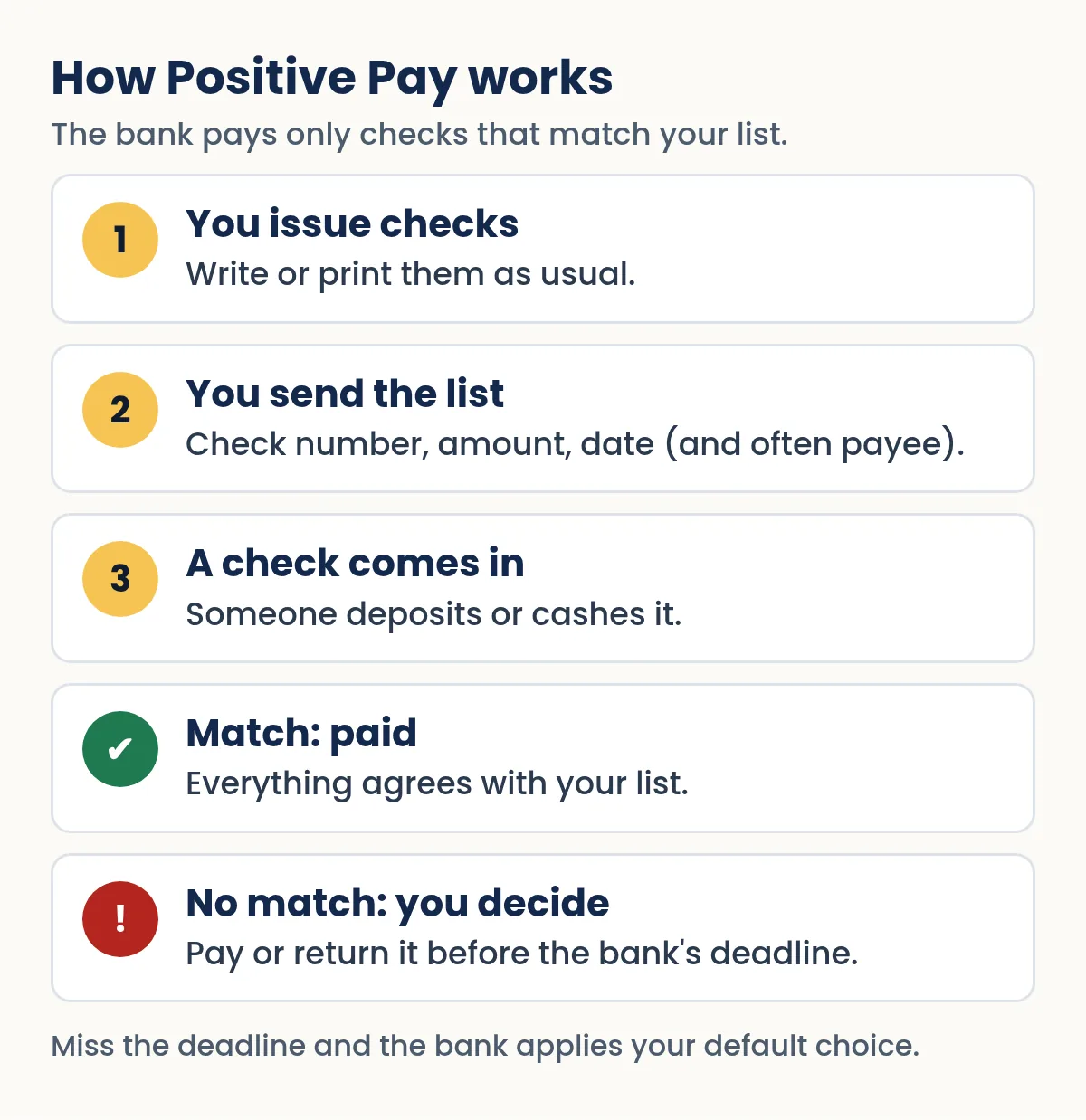
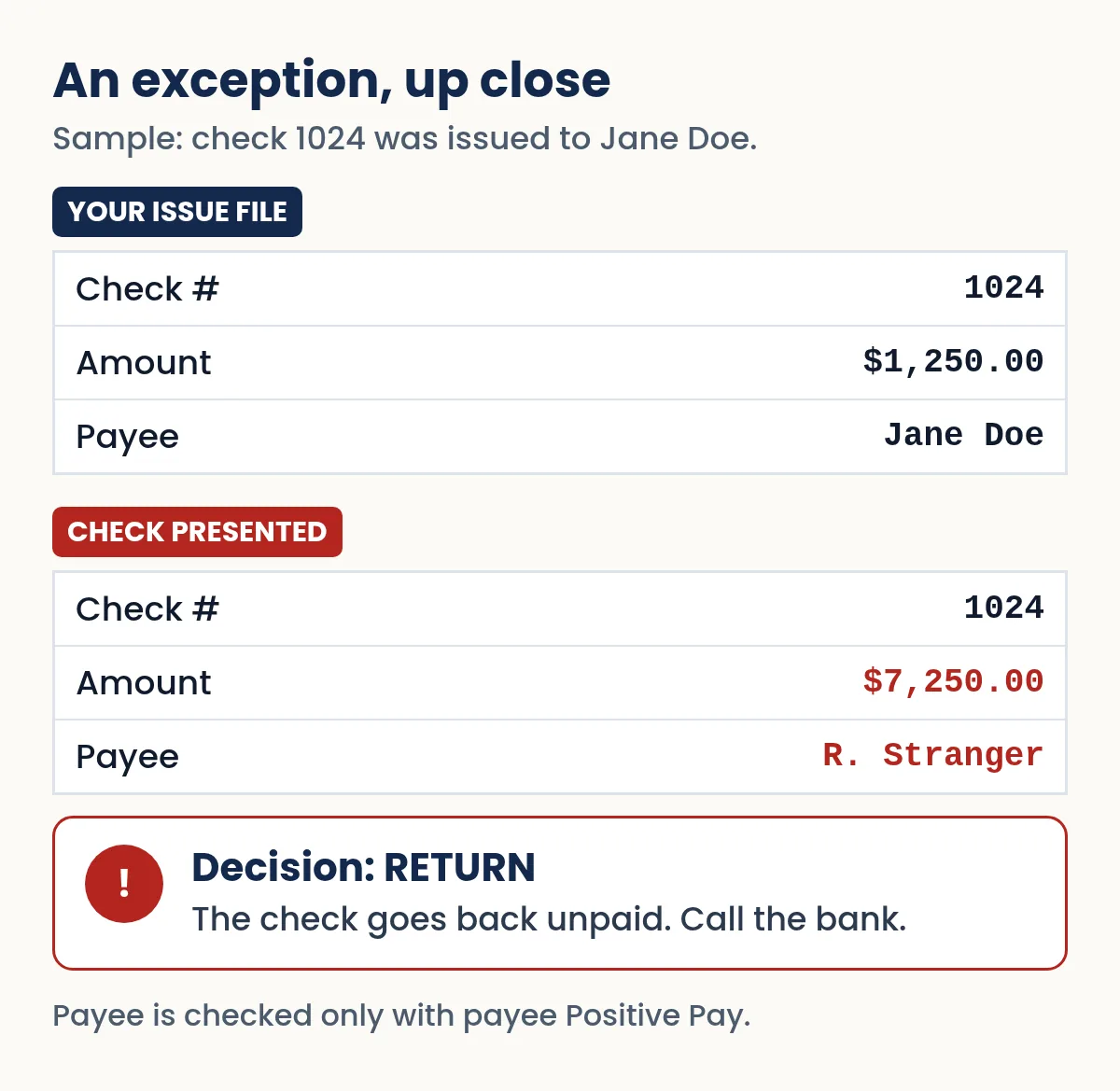
Positive Pay is a fraud-control service that banks sell mainly to business customers. Each time you write checks, you send the bank a list of them. When a check drawn on your account is presented for payment, the bank's system compares it with your list. If the check number and amount match (and, with the payee version, the payee name too), it is paid as usual. If anything is off, the check becomes an "exception," and you get to look at it and decide whether the bank should pay it or send it back.
The idea is simple: a criminal can copy your account number, print a convincing fake or wash a real check, but they cannot add their check to the list you sent your bank.
Why businesses use it
Check fraud has grown sharply in recent years. FinCEN, the Treasury's financial crimes bureau, reported that banks filed more than 680,000 suspicious activity reports about potential check fraud in 2022, nearly double the prior year. Many of those cases involve counterfeit or altered business checks, which is exactly what Positive Pay is built to catch.
There is also a liability angle. Banks increasingly expect business customers to use the fraud tools they offer. One large bank's Positive Pay product sheet, for example, warns that failing to use available fraud prevention services, including Positive Pay, may result in fraud losses the bank will not reimburse. Terms vary, so read your own treasury services agreement.
The kinds of Positive Pay
Banks package these services under slightly different names, but most offer some combination of the following.
- Standard (check) Positive Pay
- You send an issue file with each check's number, amount and date. The bank flags presented checks that are not on the file, that carry a different amount, or that duplicate a number already paid.
- Payee Positive Pay
- Adds the payee name to the comparison. This matters because a classic washed check keeps the original number and sometimes even the amount, but changes the name. Banks that offer it describe it as an add-on that detects altered payee names.
- Reverse Positive Pay
- You do not send a file. Instead the bank sends you the checks presented each day, and you decide which to pay or return. It costs less effort up front but puts the matching work on you every day.
- Teller Positive Pay
- Makes your issue information available at bank branches, so a teller can check a number and amount before cashing a check over the counter.
- ACH Positive Pay and ACH blocks or filters
- The electronic cousin. It lets you review, approve or block ACH debits against your account. It protects against unauthorized electronic withdrawals rather than paper checks.
| Feature | Standard | Payee | Reverse |
|---|---|---|---|
| You send an issue file | Yes | Yes | No |
| Catches checks not on your list | Yes | Yes | You review all checks |
| Catches changed amounts | Yes | Yes | If you spot them |
| Catches changed payee names | No | Yes | If you spot them |
| Daily effort | Low | Low | Higher |
What triggers an exception
Common exception types listed by banks include:
- A check paid that is not on your issue file (the hallmark of a counterfeit).
- A check whose amount differs from the amount you reported.
- A duplicate check number, meaning that number has already been paid once.
- A check you previously marked as void or canceled.
- With payee Positive Pay, a payee name that does not match.
- Optional rules, such as checks over a maximum dollar amount or stale-dated checks.
How to set up Positive Pay, step by step
- Ask your bank what it offers
Positive Pay usually sits under "treasury management" or "fraud prevention" services for business accounts. Ask which versions are available (standard, payee, reverse, teller, ACH), what each costs, and whether it is available on the account you write checks from.
- Get the file specification
Each bank publishes its own issue-file layout, typically a CSV or fixed-width text file with fields such as account number, check number, issue date, amount, payee and a void indicator. Some banks also let you key checks in by hand or upload a spreadsheet.
- Choose your default decision
Decide what happens if you do not respond to an exception by the bank's daily deadline: pay or return. Return is the safer default for most businesses, but it means a legitimate check can bounce if nobody reviews it in time.
- Name who reviews and who approves
Assign at least one primary and one backup reviewer, so exceptions are never ignored on a sick day or holiday. Many banks let you separate the person who reviews from the person who approves.
- Send a file every time you issue checks
Upload the list the same day you print or write checks, and before they could reasonably be presented. A check that arrives before its file is uploaded becomes a false exception.
- Review exceptions every business day
Look at the check image, compare it with your records, and make the pay or return decision before the cutoff. Banks often send an email or text when exceptions are waiting.
Quick Check Writer does not create or send Positive Pay files. What it does give you is a register of every check you print, with number, date, payee and amount, which you can export to CSV and rearrange into your bank's layout in a spreadsheet.
Need to write a check right now?
Quick Check Writer fills in the amount in words, adds the bank line and prints on blank check stock or saves a PDF. Your first check is free, with no account and no card.
Write your first check free →Building a clean issue file
Most Positive Pay problems are self-inflicted: a typo in the amount, a missing check, a void that was never reported. A few habits avoid nearly all of them.
- Generate the file from your records, not from memory. Export from your check register or accounting system rather than retyping.
- Include every check, including handwritten ones. A manual check written from the same account must go on the file too, or it will be flagged.
- Report voids. If you void a check after sending the file, send a void record so the number cannot be paid later. Our guide on how to void a check covers the paper side.
- Use the payee name exactly as printed. For payee Positive Pay, "Jane Doe" on the check and "J. Doe" on the file may cause a mismatch, depending on the bank's matching rules.
- Keep sequence numbers tidy. Never reuse a check number. Duplicates create exceptions and confuse bank reconciliation.
A small property manager prints six rent refund checks, numbers 2041 to 2046, on Monday morning. Before lunch, the bookkeeper exports those six rows from the check register, rearranges the columns to match the bank's template, and uploads the file. On Thursday a check numbered 2044 arrives for $3,400 instead of the $340 on the file. It shows up as an amount exception, the bookkeeper chooses "return," and the manager calls the bank's fraud line.
What an issue file looks like
Every bank publishes its own layout, so treat this as an illustration, not a template. A simple comma-separated issue file for three checks and one void might read:
000123456789,1024,11/01/2026,1250.00,Jane Doe,I
000123456789,1025,11/01/2026,89.40,Anytown Water,I
000123456789,1026,11/02/2026,450.00,Sample Hardware,I
000123456789,1023,10/28/2026,0.00,,V
Reading across: the account number, the check number, the issue date, the amount, the payee name (used only by payee Positive Pay) and a code for issued (I) or voided (V). Some banks want amounts without a decimal point (125000 for $1,250.00), a header or trailer row with a record count and total, or a fixed-width text file instead of CSV. Get the specification from your bank before the first upload, and send a small test file if it offers one.
Who pays when a fraudulent check gets through?
The starting rule in the Uniform Commercial Code (§ 4-401) is that a bank may charge your account only for items that are "properly payable," which a forged or altered check generally is not. But the rules also look at the customer's conduct. A customer whose carelessness substantially contributed to a forgery or alteration can be barred from shifting the loss (§ 3-406), and a customer who doesn't review statements promptly can lose claims (§ 4-406). On top of that, many business account agreements specifically shift losses to customers who decline fraud tools like Positive Pay. In practice, the question after a fraud is often "what did each side do to prevent it?", and enrolling, uploading files on time and reviewing exceptions daily is strong evidence on your side.
Setup mistakes to avoid
- Uploading after the checks are mailed. A check that reaches the bank before its file becomes a false exception, and with a "return" default it bounces.
- Forgetting the second checkbook. Every check drawn on the enrolled account must go on the file, including ones written by hand from an old checkbook.
- One reviewer, no backup. Exceptions do not wait for vacations.
- Different payee spellings. Print and upload the payee exactly the same way, especially with payee Positive Pay.
- Skipping ACH. Check Positive Pay does nothing about electronic debits. If your bank offers ACH Positive Pay or ACH filters, which let you review or block ACH debits before they post, consider it too.
How Positive Pay fits with other protections
Positive Pay is strong but not complete. It checks what is on the face of a check against your list. It does not stop someone from stealing a legitimate check and depositing it with a forged endorsement in a way that still matches, and the basic version cannot see a changed payee. Combine it with:
- Secure mailing practices and tamper-resistant check stock (see check security features).
- Internal controls such as separating who writes, signs and reconciles checks.
- Daily review of account activity and a monthly reconciliation.
- Verification of any vendor request to change where payments go, using a phone number you already have.
Our broader guide to check fraud prevention pulls all of these together, and the page on check washing explains the alteration Positive Pay's payee option is designed to catch.
Questions to ask your bank before you enroll
Positive Pay products differ more than their names suggest. Before you sign, get clear answers to these:
- Which versions do you offer on my account: standard, payee, reverse, teller, ACH?
- What is the file format, and can I upload a spreadsheet or key checks in by hand?
- What is the daily cutoff for uploading issue files, and for deciding exceptions?
- What is the default decision if no one responds, and can I choose it?
- How are exceptions delivered: online only, or also by email, text or app notification?
- Do you match payee names exactly, or allow minor differences such as punctuation?
- Are checks cashed at your branches checked against my file too (teller Positive Pay)?
- What are the monthly, per-item and per-exception fees?
- How does using, or not using, Positive Pay affect who bears a fraud loss under my agreement?
A realistic daily routine
Once it is running, Positive Pay takes a few minutes a day. A typical rhythm for a small office looks like this:
- When checks are printed: export the batch from the register and upload the issue file before the bank's cutoff.
- Each morning: open the exception queue (or the notification), compare any flagged check image with the register entry, and decide pay or return.
- When a check is voided: send a void record the same day.
- Monthly: reconcile the account, and confirm that every outstanding check on your list is still genuinely outstanding. Our guide to outstanding checks explains what to do with ones that never clear.
Is Positive Pay worth it for a small business?
It depends mostly on how many checks you write and how large they are. A business that writes a handful of small checks a month, reviews its account daily and reconciles monthly may get most of the benefit from alerts and careful habits. A business that issues dozens of checks, pays large invoices by check, or has had fraud before is usually a strong candidate. Since fees, minimums and features vary by bank, ask for the price and the default-decision rules in writing, and weigh them against your typical check size.
Individuals generally cannot get Positive Pay on personal accounts. For personal checking, the closest equivalents are balance and check-clearing alerts plus regularly reviewing check images.
Positive Pay turns your list of issued checks into a gatekeeper: if it is not on the list, it does not get paid without your say-so.
Frequently asked questions
What is the difference between Positive Pay and Reverse Positive Pay?
With Positive Pay you send the bank a list of issued checks and the bank flags mismatches. With Reverse Positive Pay you send no list; the bank sends you each day's presented checks and you decide which to pay or return.
Does Positive Pay check the payee name?
Only if you use payee Positive Pay, an add-on many banks offer. Standard Positive Pay compares the check number and amount, which will not catch a check whose only change is the payee name.
What happens if I don't review a Positive Pay exception?
The bank applies the default decision you chose when you enrolled, usually pay or return, once its daily deadline passes. Ask your bank which default you have.
Can individuals get Positive Pay?
Positive Pay is generally offered on business accounts. For personal accounts, use clearing alerts, review check images, and reconcile your account every month.
How much does Positive Pay cost?
Pricing varies by bank and may include a monthly fee and per-item or per-exception charges. Ask your bank for its current fee schedule.
Can Quick Check Writer create a Positive Pay file?
No. Quick Check Writer prints checks and keeps a register you can export to CSV, which you can rearrange in a spreadsheet to match your bank's issue-file layout.
What is a Positive Pay issue file?
It is the list of checks you send your bank each time you write them: typically account number, check number, issue date, amount, and for payee Positive Pay the payee name, plus a code for issued or voided checks. Each bank sets its own file layout.
Does Positive Pay protect against ACH fraud?
Check Positive Pay does not. Many banks offer a separate service, often called ACH Positive Pay or ACH blocks and filters, that lets you review, approve or block electronic debits before they post to your account.
Can Positive Pay stop a check with a forged endorsement?
Usually not. If a genuine check is stolen and deposited with a forged endorsement, the number, amount and payee on the face still match your file. Secure mailing, prompt follow-up when a payee says they weren't paid, and reviewing paid check images help with that risk.
Related guides
- Check fraud prevention for people and small businesses
- Check washing: how it works and how to stop it
- Check security features, explained
- How to do a bank reconciliation
- Outstanding checks
- How to Void a Check
Sources
- Bank of America: Check Positive Pay (product sheet)
- Webster Bank: Check Positive Pay
- FinCEN Alert FIN-2023-Alert003: Mail Theft-Related Check Fraud (Feb 27, 2023)
- Webster Bank: ACH Positive Pay
- UCC § 4-401, When bank may charge customer's account (Cornell LII)
- UCC § 3-406, Negligence contributing to forgery or alteration (Cornell LII)
- UCC § 4-406, Customer's duty to discover and report (Cornell LII)
Last updated November 1, 2026. This page is general information, not legal or financial advice. Quick Check Writer is check printing software; it is not a bank and does not move money.