

Key takeaways
- The verification QR isn’t a bank network or a bank program. It’s a public page anyone can open with a phone camera.
- Scan, check the address is quickcheckwriter.com/v/, read the status, compare the details.
- A mismatch, VOIDED, SAMPLE or NOT FOUND result means stop and confirm.
- A match confirms the details, not the funds. Your bank’s usual procedures still apply.
On this page
What it is, and what it isn’t
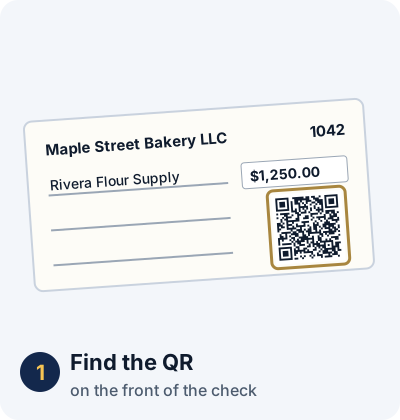
When a check writer issues a check with Quick Check Writer Pro on the website and turns on the verification QR, the check’s details are saved on Quick Check Writer’s server, and a QR code that opens that record is printed on the front of the check, under the amount box, marked “SCAN TO VERIFY”.
It isn’t part of check clearing, and it isn’t a service banks sign up for. It doesn’t change how a check is processed. It’s an extra look anyone holding the check can take, with no app and no account.
The 10-second routine
- Scan
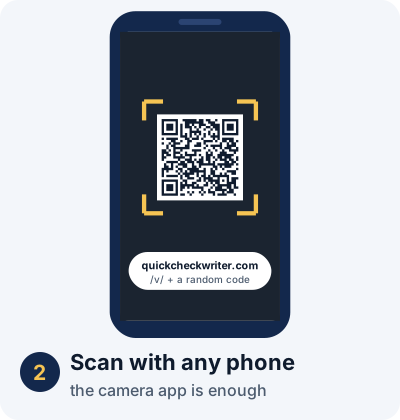
Point any phone camera at the QR on the front of the check and open the link.
- Check the address
The page must be on quickcheckwriter.com/v/ followed by a long code. Any other website is a red flag.
- Read the status
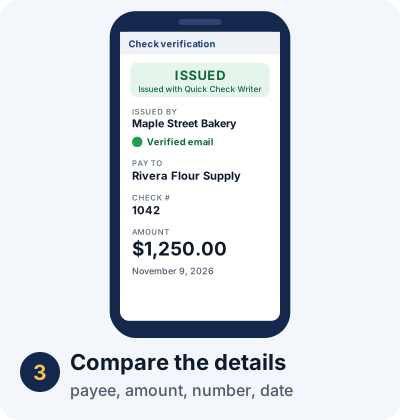
ISSUED, VOIDED, SAMPLE – NOT VALID, or NOT FOUND, shown at the top of the page.
- Compare
Payee, amount, check number and date on the page against the paper check. They should match exactly.
What each result means
| Result | What it means |
|---|---|
| ISSUED, details match | Details confirmed. The check was issued with these details and hasn’t been voided. |
| ISSUED, payee or amount differs | Stop. The paper was changed after it was issued. |
| VOIDED | Stop. The writer cancelled this check. |
| SAMPLE – NOT VALID | Stop. It was never a real check. |
| NOT FOUND | Red flag. The code doesn’t belong to any check. |
| Opens another website | Red flag. Possibly a lookalike page. |
| QR missing, scraped or covered | Red flag if the writer normally prints one. The check can’t be verified. |
What the page shows
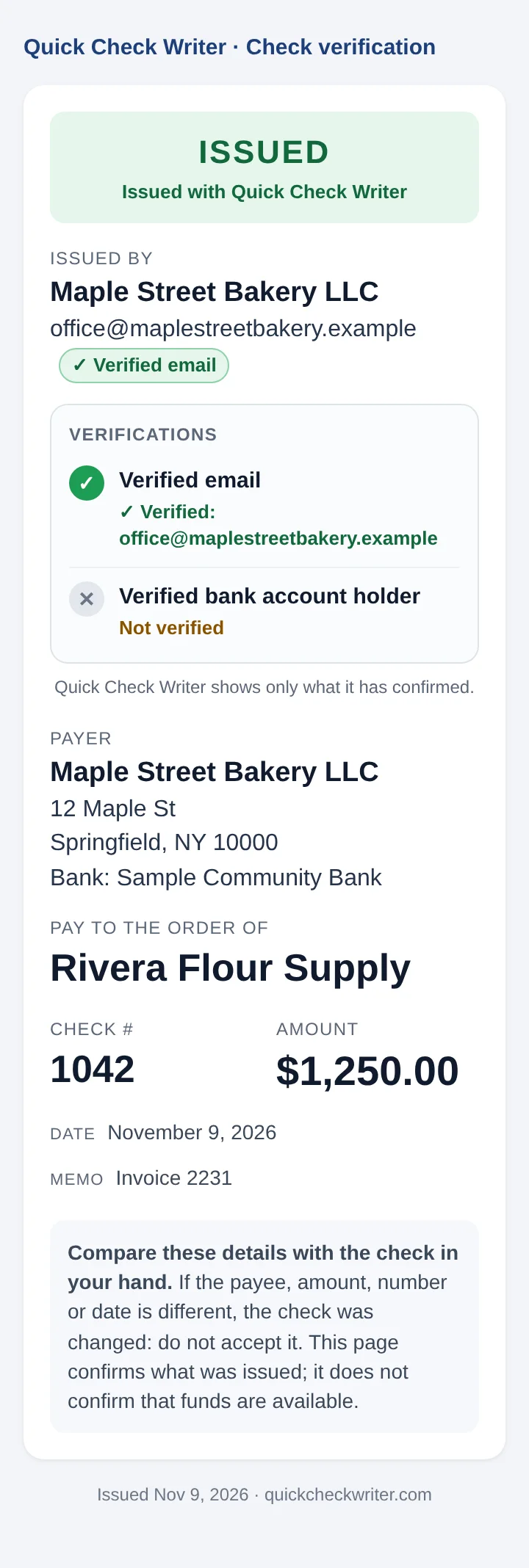
- Status at the top.
- Issued by: the issuer’s name or company as stored in their account.
- Verified email: whether the issuer’s email was verified when the check was issued.
- Verified bank account holder: coming soon, a $4.99 one-time bank owner check. Until then the row reads “Not verified”.
- The check: payer, payee, check number, amount, date and memo.
It never shows bank account numbers, routing numbers or the signature, and it’s kept out of search engines. A record can only be opened by someone holding the check with its code.
What the scan doesn’t replace
A match confirms the details, not the money, and it isn’t a promise the check will clear. It doesn’t check the balance, the signature or the endorsement, and it doesn’t replace hold policies, account checks or a call to the bank the check is drawn on. Treat it as one more piece of evidence, especially useful for catching an altered payee or amount, and follow your bank’s own procedures for everything else.
It also won’t flag an exact duplicate deposited twice, because the details match. That’s what duplicate detection and Positive Pay are for.
If you’re depositing the check yourself
You don’t need to wait for a teller. Scan the check before you deposit it or hand over goods, using the same four steps. The verification QR guide covers the page in detail, and how to tell if a check is real or fake covers checks without a QR.
Put a verification QR on your checks
Verification QR is included with Quick Check Writer Pro on the website. Tick one box when you issue a check, and anyone you pay can confirm it in seconds.
See Pro plans →Related guides
- How to Verify a Check and Stop Check Fraud with a Verification QR Code
- How to Tell If a Check Is Real or Fake
- Can a QR Code on a Check Be Removed or Faked? The Honest Answer
- How Small Businesses Can Prevent Check Fraud
- Check Washing: What It Is and How to Protect Your Checks
- How to verify a check before you deposit it
Frequently asked questions
Do banks officially accept or use the verification QR?
The QR doesn’t change how a bank processes a check, and it isn’t a bank program. It’s a public page that anyone, including bank staff, can open with a phone camera as an extra check on the payee and amount.
Does a teller need an app or an account to scan it?
No. Any phone camera that reads QR codes opens the page in a normal web browser. No app, sign-in or account is needed.
Does a matching scan mean the check will clear?
No. A match confirms the check was issued with those details and hasn’t been voided. Only the bank the check is drawn on can confirm the funds.
Does the scan page show the customer’s account number?
No. It shows the payee, amount, check number, date, memo and the issuer’s details as saved. It never shows bank account numbers, routing numbers or the signature.
Last updated November 9, 2026. This page is general information, not legal or banking advice. Quick Check Writer is check printing software; it is not a bank, does not move money, and a verification QR does not guarantee that a check will be paid.