

Key takeaways
- A verification QR is printed on the check itself and opens that check's own record on quickcheckwriter.com.
- The payee or bank teller compares the paper check to the scan page. If the payee or amount was changed, they won't match.
- The QR is printed in the same ink on the check paper, not stuck on. A missing or covered QR is a red flag, not a way around it.
- A copied QR still shows the original payee and amount, so a photocopy with a new amount gets caught.
- The QR holds a random code, never bank numbers.
On this page
- The check fraud problem in plain words
- What a verification QR is
- How it works, step by step
- How to verify a check in 10 seconds
- What the scan page shows
- Why the QR stays on the check
- What it catches, and what it doesn’t
- Tips for check writers
- Tips for people receiving a check
- More guides on check verification
- Frequently asked questions
The check fraud problem in plain words
A paper check carries everything a thief needs: a name, a bank, an account number and a signature. Once it leaves your hands, you can't see what happens to it. Most check fraud takes one of three forms:
- Altered checks
- A real check with the payee or the amount changed. $125 becomes $1,250, or "Rivera Flour Supply" becomes someone else's name.
- Washed checks
- The thief uses chemicals to lift the ink, then writes a new payee and amount on the same real check paper. The U.S. Postal Inspection Service explains how check washing works, often with checks stolen from mailboxes. More in our check washing guide.
- Fake checks
- A counterfeit printed from scratch, often copied from a real one, with a real bank's name on it.
This isn't rare. In its September 2024 analysis, the Treasury's Financial Crimes Enforcement Network (FinCEN) reviewed 15,417 reports from banks about check fraud tied to mail theft, covering more than $688 million in suspicious activity over six months. Of the stolen checks, 44 percent were altered and then deposited, and 26 percent were used as templates for counterfeits.
The hard part for the person receiving a check is that an altered check looks real, because it is a real check. The usual way to confirm one is to call the bank it's drawn on, and many banks won't share details about a personal or business account.
What a verification QR is
When you issue a check with Quick Check Writer Pro on the website, you can tick Add verification QR. Two things happen:
- The check's details are saved on Quick Check Writer's server as a record: payee, amount, date, check number, and the issuer name and company as stored in your account.
- A unique QR code is printed on the front of the check, under the amount box. It holds one thing: a link to quickcheckwriter.com/v/ followed by a long random code. It doesn't contain your account number, your routing number or your signature.
Anyone holding the check can scan that code and see the record. If what's printed matches what was saved, the check is the one you wrote.
The paper can be changed. The record behind the QR can't. So the record is the referee.
How it works, step by step
- You fill in the check
Payee, amount, date and memo, as usual. Tick "Add verification QR" under the memo line.
- The record is saved first
Before the check prints, the details are saved to your account on the server and given a random ID. If the save fails, for example when you're offline, the check prints without a QR rather than with one that might be wrong.
- The QR prints on the check
It prints right on the face of the check, in the same ink as everything else, marked "SCAN TO VERIFY". Print it on blank check stock or save it as a PDF.
- The record stays fixed
A saved record is never rewritten. Reprint the same check and you get the same QR. Change any detail and it becomes a new check with a new QR.
- You stay in control
If a check is lost or you cancel it, void it in your check register. The scan page then says VOIDED.
How to verify a check in 10 seconds
No app and no account needed. A payee, a landlord, a vendor or a bank teller can do this with any phone camera:
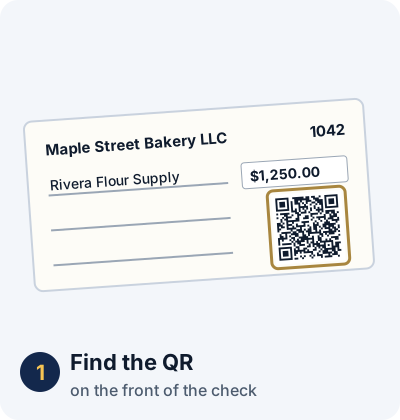
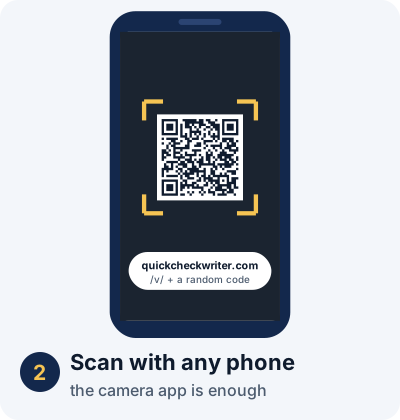
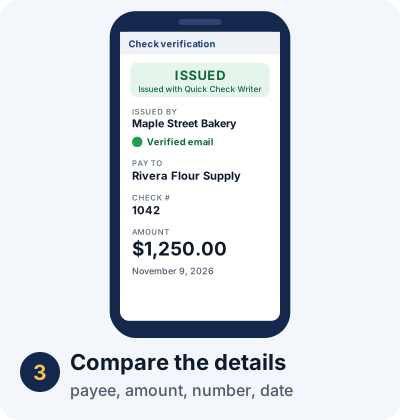
- Scan the QR on the front of the check with your phone's camera.
- Check the address. The page must be on quickcheckwriter.com/v/. Any other website is a red flag.
- Read the status. ISSUED is what you want. VOIDED means the writer cancelled the check. SAMPLE means it was never a real check.
- Compare the details with the paper: payee, amount, check number and date. They should match exactly.
If everything matches, you know the check was issued with those details and hasn't been voided. If anything is off, don't accept it yet.

What the scan page shows
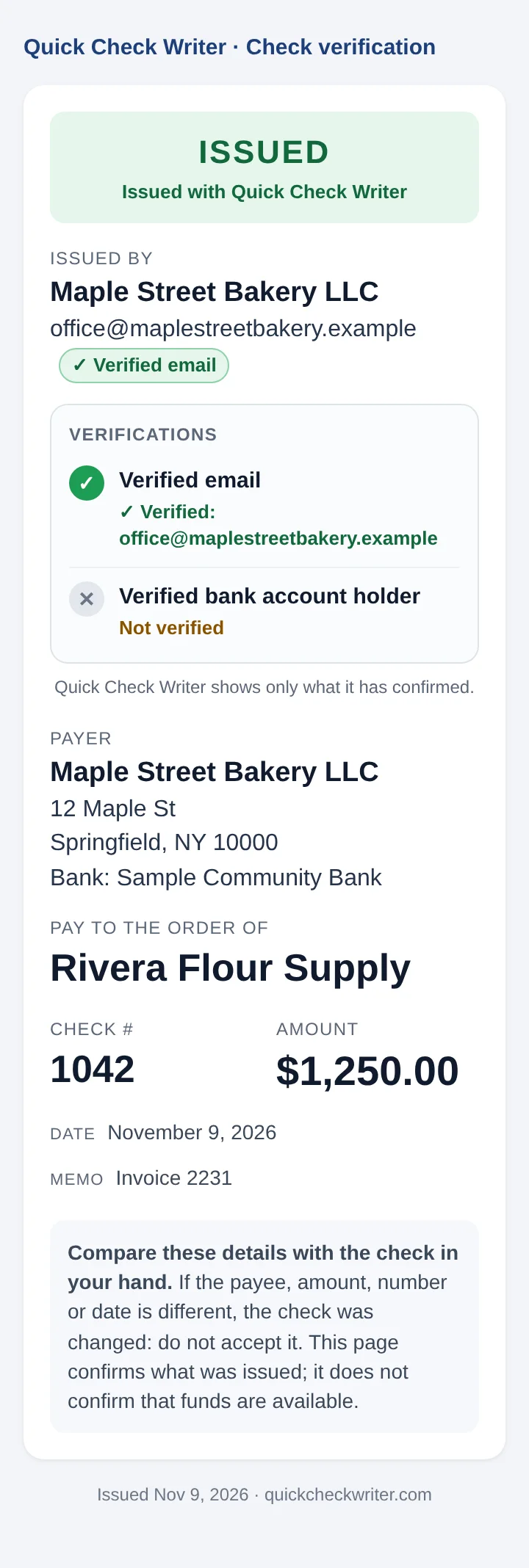
The page shows only what was saved when the check was issued:
- Status: ISSUED, VOIDED, or SAMPLE – NOT VALID. A code that doesn't belong to any check shows NOT FOUND.
- Issued by: the issuer's name or company as stored in their account.
- Verified email: whether the issuer's email address was verified when the check was issued.
- Verified bank account holder: coming soon. A one-time $4.99 verification, through secure bank linking, will confirm that the issuer owns the bank account the check is drawn on. Until then this row reads "Not verified".
- The check itself: payer, payee, check number, amount, date and memo.
The page never shows bank account numbers, routing numbers or the signature. It's kept out of search engines, and there's no way to browse other people's checks. You can only open a record if you hold the check with its code.
Why the QR stays on the check
A fair question: if the QR is what catches fraud, can't a fraudster just get rid of it? Here's why that doesn't work:
- It's printed, not stuck on. The QR prints in the same ink, at the same time, directly on the check paper. It's not a sticker or a label, so there's nothing to peel off.
- Removing it shows. Scraping, scratching or covering the code leaves visible damage on the face of the check, right next to the amount.
- Removing it doesn't help. A check without its QR can't be verified. Anyone who knows the writer uses verified checks will treat a missing or covered code as a red flag and confirm another way.
- Copying it doesn't help either. A photocopy or counterfeit that reuses the QR still opens the original record, with the original payee and amount. Change the amount on the copy and it no longer matches.
A check without its QR fails verification. So the code can't just be removed to hide a change.
What it catches, and what it doesn't
| Situation | What the scan shows |
|---|---|
| Amount changed | Caught. The page shows the original amount. |
| Payee washed and rewritten | Caught. The page shows the original payee. |
| Photocopy with new details | Caught. The copied QR opens the original record. |
| Check you cancelled | Caught. The page says VOIDED. |
| QR missing or covered | Red flag. The check can't be verified. |
| QR pointing to another website | Red flag, if the reader checks the address. |
| Exact copy deposited twice | Not caught by the QR. The details match. Your bank's duplicate checks and Positive Pay cover this. |
| Not enough money in the account | Not covered. Only the bank can confirm funds. |
So the QR adds a strong check on the details, but it doesn't replace your bank. For a large check from someone you don't know, still confirm it with the bank it's drawn on.
Tips for check writers
- Turn on the QR for checks that matter: rent, vendors, payroll, anything you mail.
- Verify your email so the scan page shows "Verified email" next to your name. Signing in with Google does this automatically.
- Use your real business name in your account. It's what the payee sees as "Issued by".
- Tell people you pay that your checks carry a verification QR, so a check without one stands out.
- Void lost or cancelled checks right away in the check register.
- Keep the basics too: mail checks from inside a post office, write amounts tightly, and read our check fraud prevention guide.
Tips for people receiving a check
- Scan before you deposit, and before you hand over goods or keys.
- Look at the web address, not just the page. It must be quickcheckwriter.com/v/.
- Compare every detail: payee, amount, check number, date.
- Treat a scratched, covered or missing QR as a reason to slow down, if the writer normally uses one.
- If it doesn't match, don't deposit it. Contact the writer on a phone number you already have, not one printed on the check, and tell your bank.
Put a verification QR on your checks
Verification QR is included with Quick Check Writer Pro on the website. Tick one box when you issue a check, and anyone you pay can confirm it in seconds.
See Pro plans →More guides on check verification
- How to Tell If a Check Is Real or Fake
- Check Washing: What It Is and How to Protect Your Checks
- How Small Businesses Can Prevent Check Fraud
- Can a QR Code on a Check Be Removed or Faked? The Honest Answer
- How Banks and Tellers Can Verify a Check in Seconds with a QR Scan
Frequently asked questions
Can a QR code on a check be faked?
Anyone can print a QR code, so a fraudster could add their own code that points to a lookalike website. That's why you check two things: the page must open on quickcheckwriter.com/v/, and every detail on it must match the paper check. A made-up code doesn't open a real record on Quick Check Writer's site.
Can the verification QR be removed from the check?
It's printed in the same ink, directly on the check paper, so there's no sticker or label to peel off. Scraping or covering it leaves visible damage. And removing it doesn't help a fraudster: a Quick Check Writer check without its QR can't be verified, which is itself a reason to stop and confirm the check another way.
What if someone photocopies the check and changes the amount?
The copied QR still opens the original record, which shows the original payee and amount. When the printed amount doesn't match the scan page, the change is caught.
Does the scan show my bank account or routing number?
No. The QR holds only a random code. The scan page shows the payee, amount, check number, date and the issuer details saved with the check. It never shows bank account numbers, routing numbers or your signature.
Does a matching scan mean the check will clear?
No. A match confirms the check was issued with Quick Check Writer with those exact details and hasn't been voided. It doesn't confirm the money is in the account. Only the bank the check is drawn on can tell you that.
What if I void a check after I hand it over?
Void it in your check register and the scan page changes to VOIDED, telling anyone who scans it not to accept it.
Who can add a verification QR?
Quick Check Writer Pro accounts on the website. Tick “Add verification QR” when you issue a check. It isn't in the Android app yet.
Sources: FinCEN: In-depth analysis of check fraud related to mail theft (Sept 9, 2024) · U.S. Postal Inspection Service: Check washing · OCC: Check fraud.
Last updated November 9, 2026. This page is general information, not legal or banking advice. Quick Check Writer is check printing software; it is not a bank, does not move money, and a verification QR does not guarantee that a check will be paid.