
Key takeaways
- Record every check, card purchase, ATM withdrawal and deposit as it happens.
- Each month, tick off items that appear on your statement.
- Enter fees, interest and automatic payments you hadn't recorded.
- Statement balance + deposits in transit − outstanding checks = register balance.
- If it's off, look for a missing item, a doubled entry or transposed digits.
On this page
- What "balancing a checkbook" means
- What you need
- Part 1: Keep the register as you go
- Part 2: Balance it against your statement, step by step
- A worked example
- When it doesn't balance: how to find the difference
- Three situations, and what to do
- Five-minute balancing checklist
- Starting fresh if you've never balanced (or fell behind)
- Shared accounts and debit-heavy accounts
- How often should you balance?
- Paper register, spreadsheet or app?
- Habits that make balancing painless
- FAQ
What "balancing a checkbook" means
Balancing a checkbook is the habit of keeping your own record of every payment and deposit, then comparing it with your bank statement once a month to make sure the two agree. The record is called a check register. The monthly comparison is called reconciling.
It sounds old-fashioned in an age of banking apps, but the app only shows what the bank has processed so far. It does not know about the check you mailed yesterday, the rent check your landlord hasn't deposited, or the automatic payment that hits next Tuesday. Your register does. That is why people who balance their checkbook rarely overdraw their account, and why they spot fraud and bank errors quickly.
The IRS makes the same point to small businesses in Publication 583: reconcile your checking account every month, so you know how much money you really have, your records include all bank charges, and errors in either the statement or your books get corrected.
What you need
- A register. The paper booklet that came with your checks, a spreadsheet, or check software that records checks for you.
- Your bank statement for the month, paper or PDF, or the transaction list in online banking.
- Your receipts for debit card purchases, ATM withdrawals and deposits, if you keep them.
- Fifteen to thirty minutes once a month.
Part 1: Keep the register as you go
Balancing at the end of the month is easy only if you have kept the register during the month. For every transaction, write:
- Number
- The check number, or a code such as ATM, DEB (debit card), DEP (deposit), AUTO (automatic payment) or FEE.
- Date
- When you wrote the check or made the transaction.
- Description
- The payee or the source of a deposit. Add a few words if it helps ("Anytown Electric, Oct bill").
- Payment or deposit
- The amount, in the correct column.
- Cleared mark
- Left blank for now. You tick it when the item appears on your statement.
- Balance
- The running total: last balance minus the payment, or plus the deposit.
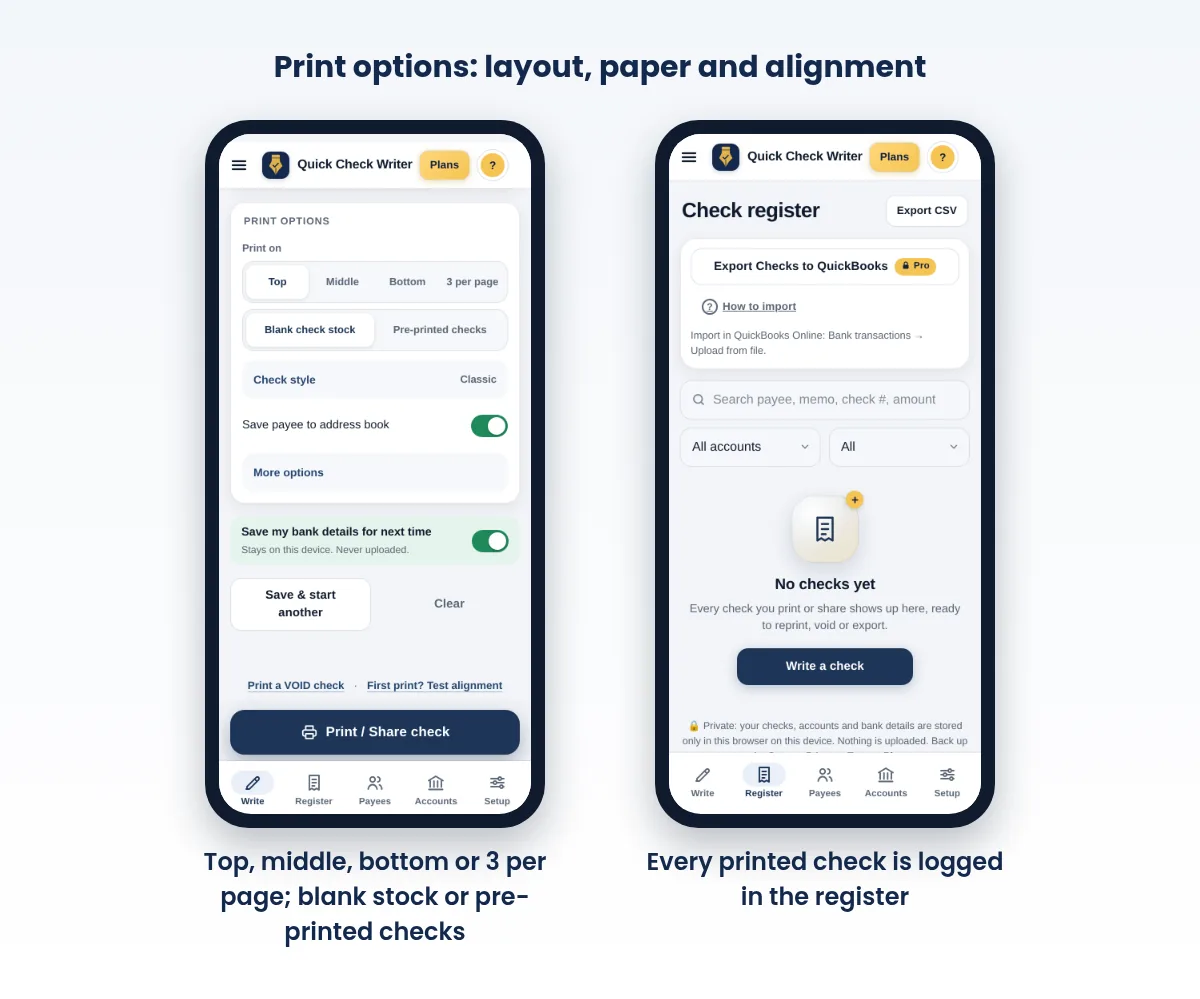
Record the check before you hand it over or seal the envelope. Most register mistakes are checks that never got written down. If you print checks with Quick Check Writer, each printed check is logged in the app's register automatically, with number, date, payee and amount.
Remember the transactions that don't involve a check: debit card purchases, ATM withdrawals, transfers, automatic bill payments, interest and bank fees. If money moved in or out, it belongs in the register.
Part 2: Balance it against your statement, step by step
- Check your own math first
Re-add the running balance in your register for the month. A simple addition slip is the most common cause of a mismatch, and it is far easier to find before you bring the bank into it.
- Tick off the deposits
For each deposit on the statement, find it in your register and put a check mark in the cleared column. Compare amounts as you go and note any differences.
- Tick off the checks and withdrawals
Do the same for every check, debit, ATM withdrawal, transfer and automatic payment on the statement. Match the check number and the amount, not just the amount.
- Add what the bank knows and you don't
The statement may show items you never recorded: monthly fees, interest earned, a returned-check charge, an automatic payment you forgot. Enter each in your register now and adjust your running balance.
- List what you know and the bank doesn't
Any register item without a tick is still in transit. Unticked checks and withdrawals are outstanding; unticked deposits are deposits in transit. Total each list.
- Do the equation
Start with the statement's ending balance. Add deposits in transit. Subtract outstanding checks and withdrawals. The result is your adjusted bank balance, and it should exactly equal your register balance.
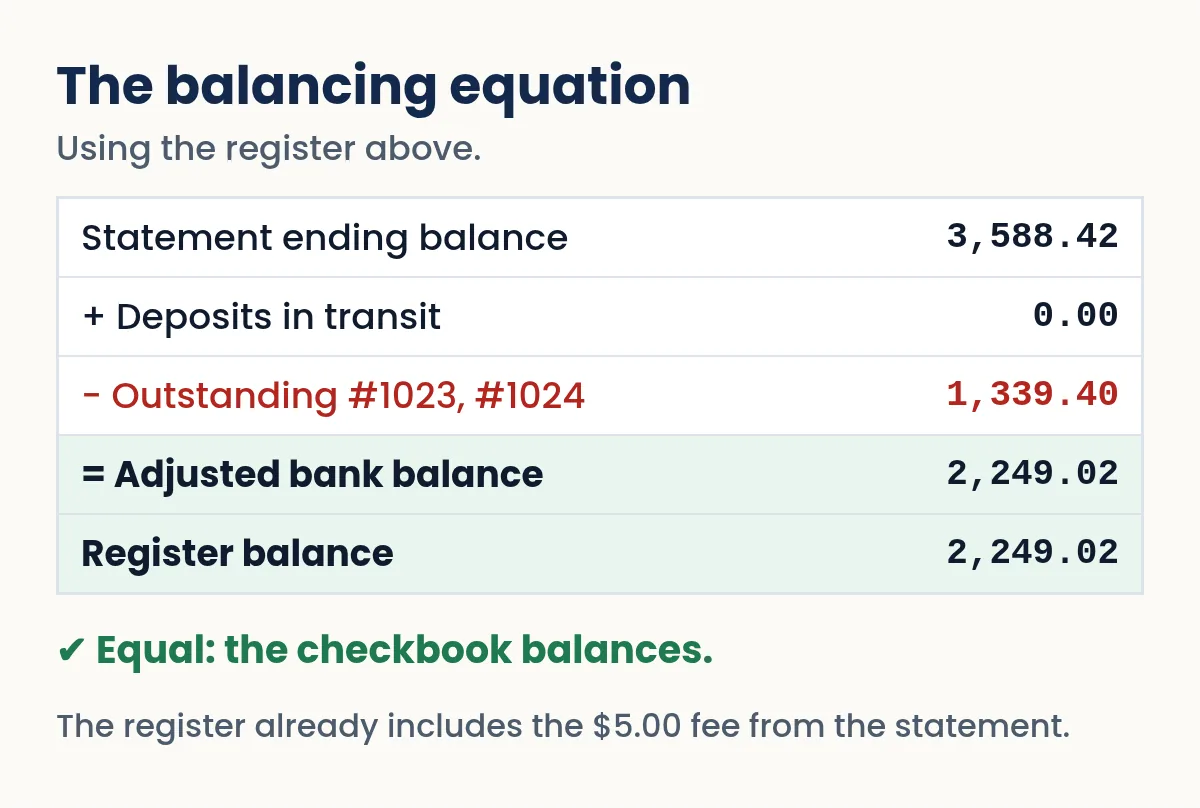
Statement balance + deposits in transit − outstanding checks = your register balance.
A worked example
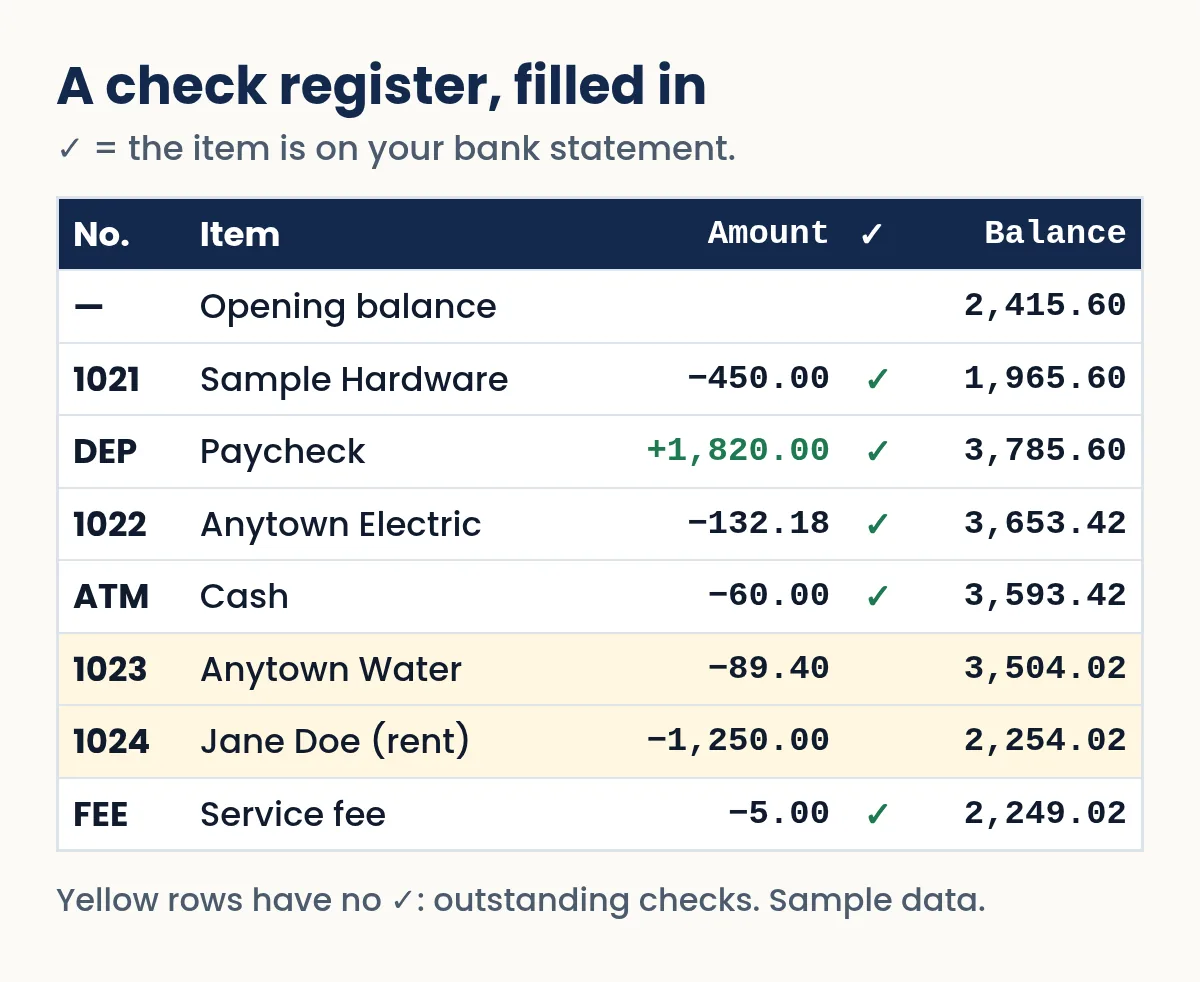
John Sample's November statement ends at $3,588.42. In his register he has ticked every item that appears on it. Two checks are unticked: #1023 to Anytown Water for $89.40 and #1024 to Jane Doe for $1,250.00. He has no deposits in transit. The statement also shows a $5.00 monthly fee he had not recorded, so he enters it, bringing his register to $2,249.02. Then: $3,588.42 + $0.00 − $1,339.40 = $2,249.02. The adjusted bank balance matches the register. He's balanced.
Need to write a check right now?
Quick Check Writer fills in the amount in words, adds the bank line and prints on blank check stock or saves a PDF. Your first check is free, with no account and no card.
Write your first check free →When it doesn't balance: how to find the difference
A mismatch is normal the first few times. Work through these checks in order; one of them almost always finds it.
| Clue | Likely cause |
|---|---|
| The difference equals one transaction | An item you forgot to record, or recorded twice |
| The difference equals a fee or interest amount | A bank charge or credit you haven't entered |
| The difference is twice a transaction's amount | A payment entered as a deposit, or the reverse |
| The difference divides evenly by 9 | Transposed digits, such as 63.40 written as 36.40 |
| The difference is a round number such as 10.00 or 100.00 | An addition or subtraction slip in the running balance |
| Last month didn't balance either | An old error carried forward; go back a month |
If you still cannot find it, compare the check images in online banking with your register. Sometimes a check cleared for a different amount than you wrote, which can mean a bank encoding error or an altered check. Either way, call the bank. Under UCC § 4-406, you are expected to review statements with reasonable promptness and report unauthorized or altered items, and you lose the right to dispute them entirely after one year. Our guide to check fraud prevention covers what to do.
It is tempting to write in a correction and move on. Small unexplained gaps hide real problems: a forgotten subscription, a duplicated charge, or fraud. Find the cause; if after a careful search you truly can't, note the amount and look again next month.
Three situations, and what to do
Your register says you have money, but the bank says you don't
Banks often show two numbers: a current (or ledger) balance and an available balance. The available balance subtracts holds, such as pending card purchases and the part of a recent deposit the bank hasn't released yet. Under the federal funds availability rule (Regulation CC), banks generally must make the first $275 of a check deposit available by the next business day, and the rest can take longer. So a large check you deposited this morning may be in your register but not yet spendable. Before writing a check against a fresh deposit, look at the available balance, not just your register.
A deposit you made is missing from the statement
If it was made on the last day or two of the statement period, it is probably a deposit in transit and will show on next month's statement. If it is older than that, find the receipt (or the mobile-deposit confirmation) and contact your bank. Keep deposit receipts until the deposit appears on a statement.
A check cleared for a different amount than you wrote
Open the check image in online banking. If the bank simply misread your numbers, ask it to correct the encoding error. If the payee or the amount was changed, that's fraud: call the bank the same day. For paper checks, the Uniform Commercial Code expects prompt review of your statements. For debit card, ATM and other electronic transfers on a personal account, Regulation E gives you 60 days from when the statement showing the error was sent to report it, and reporting sooner limits your losses.
Five-minute balancing checklist
- Statement ending balance written down, with the statement's closing date.
- Every deposit ticked, or listed as in transit.
- Every check and withdrawal ticked, or listed as outstanding.
- Fees, interest and automatic payments from the statement added to your register.
- Statement balance + deposits in transit − outstanding items = register balance, to the cent.
If line 5 works, initial and date the register page. That small mark tells future-you exactly where the last clean balance was.
Starting fresh if you've never balanced (or fell behind)
You do not need to reconstruct years of history. Pick a clean starting point and go forward from there.
- Use your latest statement as the starting line
Take the ending balance on your most recent statement.
- Subtract what's still out there
List any checks you wrote that have not appeared on any statement yet, plus any scheduled payments that have already been sent. Subtract them.
- Add deposits not yet shown
Add any deposit you made after the statement date.
- Write that number as your opening balance
Enter it at the top of a fresh register page, dated today. From here on, record everything as it happens and balance at each new statement.
If you have older checks you are unsure about, look at your bank's list of cleared checks by number. Any number you wrote that never shows up is outstanding, possibly lost, and worth a call to the payee.
Shared accounts and debit-heavy accounts
Joint accounts are where registers fall apart, because each person forgets the other's spending. Agree on one shared register, such as a shared spreadsheet or app, and make it a rule that whoever writes a check or makes a withdrawal records it the same day.
Debit-card-heavy accounts have many small transactions and fewer checks. You can still balance them: record purchases daily from your receipts or your bank's transaction list, and pay special attention to pending card authorizations, which can change amount when they post (restaurant tips and fuel purchases often do). The monthly method is exactly the same.
How often should you balance?
Once a month, when the statement arrives, is the standard and the IRS recommendation for businesses. If you write many checks or run your account close to zero, a quick weekly check of your register against online banking keeps surprises away. Many people find the monthly task takes ten minutes once the register is kept faithfully.
Paper register, spreadsheet or app?
| Paper register | Spreadsheet | Check software | |
|---|---|---|---|
| Cost | Free with checks | Free | Varies |
| Running balance math | By hand | Automatic | Automatic |
| Records checks for you | No | No | Yes, for checks it prints |
| Searchable | No | Yes | Yes |
| Works without the internet | Yes | Usually | Depends on the app |
Whatever you use, the method is the same. Quick Check Writer keeps a register of every check you print and lets you search, reprint, void and export it to CSV, so you can paste your checks into a spreadsheet alongside card and ATM transactions. Read more about our check register app.
Habits that make balancing painless
- Record every check before it leaves your hands, and every card purchase the same day.
- Round nothing. Write exact cents.
- Write "VOID" in the register for spoiled checks so the number sequence has no unexplained gaps. See how to void a check.
- Keep a small buffer in the account so a late-clearing check never bounces. If one does, our guide on what happens when a check bounces explains the fallout.
- Balance the same day each month, right after the statement arrives.
For businesses, the same process grows into a formal bank reconciliation, which adds journal entries and documentation but follows the same logic.
Frequently asked questions
What does it mean to balance a checkbook?
It means keeping your own record of every transaction in a check register and comparing it with your bank statement each month so both show the same balance once timing differences are accounted for.
Why doesn't my bank balance match my checkbook?
Usually because of checks you wrote that haven't cleared, deposits not yet credited, bank fees or interest you didn't record, or a math or recording error in your register.
How often should I balance my checkbook?
At least once a month when your statement arrives. If you run your account close to zero or write many checks, a quick weekly check helps.
What if the difference is divisible by 9?
That usually signals transposed digits, such as 54.20 written as 45.20. Compare each amount in your register with the statement.
Do I still need a check register if I use online banking?
Yes, if you write checks or schedule payments. Online banking shows only what has cleared, while your register includes checks and payments still in transit.
How long should I keep bank statements?
Keep them as long as you might need them for taxes; the IRS generally expects records supporting a return to be kept until its period of limitations ends, which is often three years. Businesses and special situations may need longer.
What is the difference between available balance and current balance?
The current (ledger) balance includes everything the bank has posted. The available balance subtracts holds, such as pending card purchases and deposits not yet released. Federal rules generally require the first $275 of a check deposit to be available by the next business day, so a big deposit may show in your balance before it is fully spendable.
What is a deposit in transit?
A deposit you made and recorded in your register that did not appear on the bank statement yet, usually because you made it near the statement's closing date. When balancing, you add deposits in transit to the statement balance.
Can I balance my checkbook without a paper statement?
Yes. Use the PDF statement from online banking, or pick a cutoff date and use the transaction history up to that date. The key is a fixed ending balance on a fixed date, so the equation can come out exactly.
Related guides
- How to do a bank reconciliation
- Outstanding checks
- Check register app that fills itself in
- How to write a check, step by step
- How to Void a Check
- What happens when a check bounces
Sources
- IRS Publication 583: Starting a Business and Keeping Records
- UCC § 4-406, Customer's duty to discover and report (Cornell LII)
- IRS: How long should I keep records?
- Federal Reserve: A Guide to Regulation CC Compliance (next-day $275)
- CFPB: Regulation E § 1005.11, Procedures for resolving errors
Last updated November 1, 2026. This page is general information, not legal or financial advice. Quick Check Writer is check printing software; it is not a bank and does not move money.