
Key takeaways
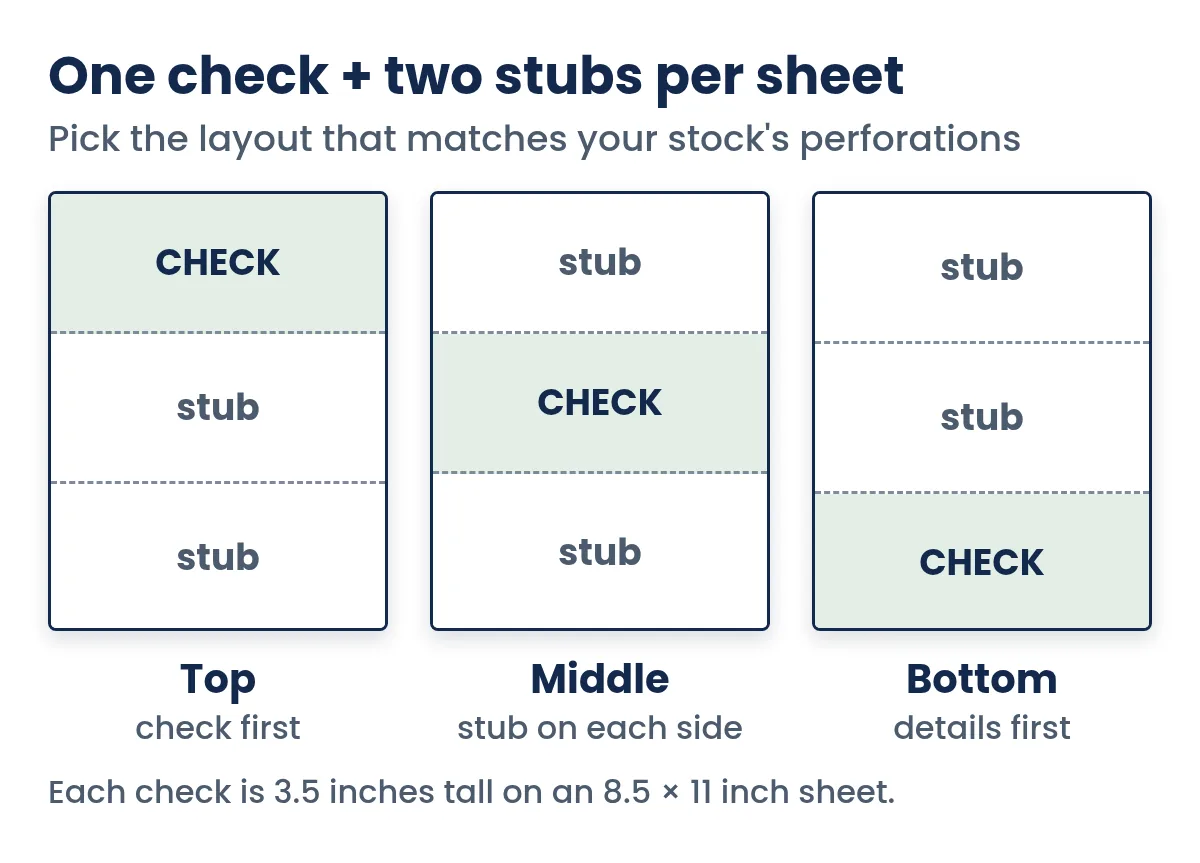
- Top, middle, bottom: one 3.5-inch check plus two stubs.
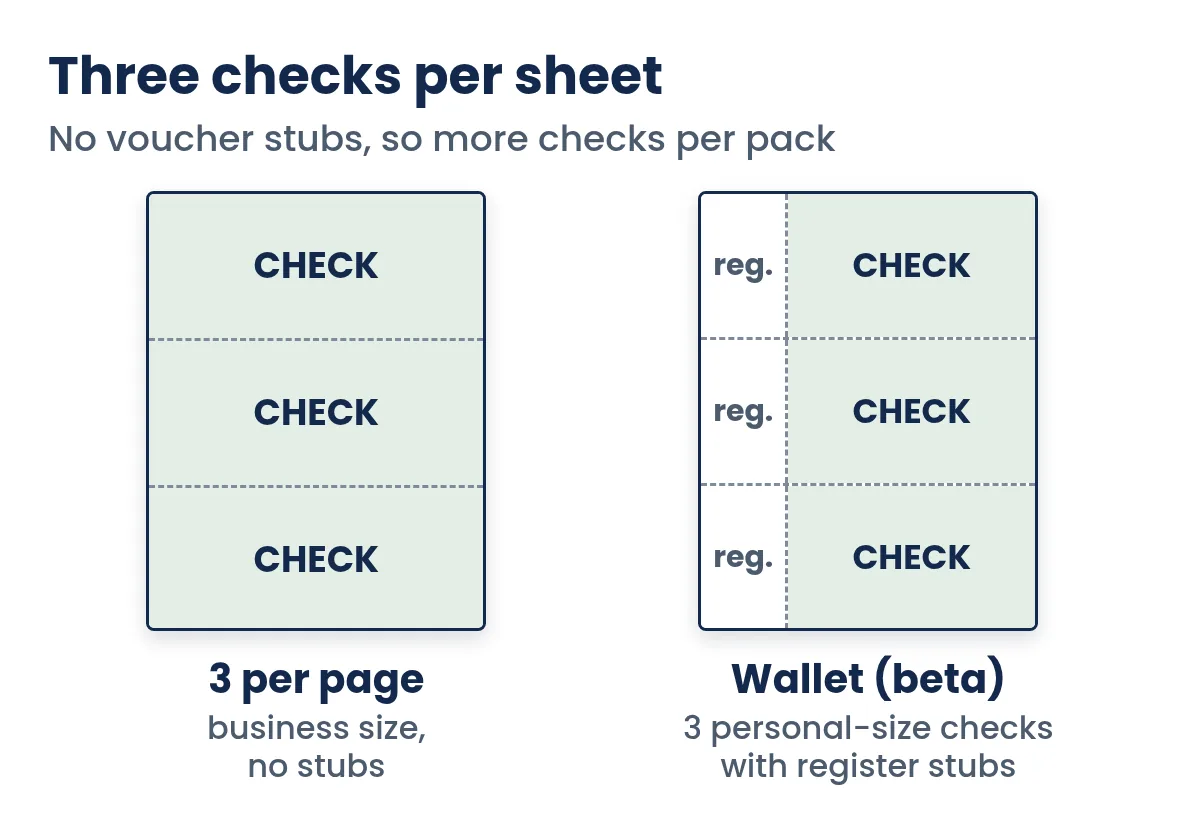
- 3 per page: three checks, no stubs, lowest cost per check.
- Wallet (beta): three personal-size checks with register stubs.
- Match the layout to your stock's perforations.
- Print at 100% scale and test alignment on plain paper.
On this page
- Why the layout matters
- Check on top
- Check in the middle
- Check on bottom
- Three checks per page
- Wallet-size personal checks
- Which layout should you choose?
- Worked example: two payers, two layouts
- How to choose a layout in Quick Check Writer
- Getting the alignment right
- What never moves: the bank line at the bottom
- Business checks vs personal checks
- Layouts with pre-printed checks
- A quick checklist before you buy stock
- Layouts and window envelopes
- Common layout mistakes and how to avoid them
- FAQ
Why the layout matters
Banks don't care where on your sheet the check was printed; they only see the check after it's torn off. The layout matters to you, for three practical reasons:
- Your check stock. Pre-perforated blank stock has its perforations in fixed places. The check must print in the section the perforations create, or you'll tear through it.
- Stubs or no stubs. Voucher layouts give you one check and two stubs per sheet; the 3-per-page layout gives you three checks and no stubs.
- Envelopes and filing. Where the check and payee address fall decides how the sheet folds into a window envelope, and whether you keep an office copy.
Check on top
The check fills the top 3.5 inches of the sheet, and two stubs share the rest. It's a popular choice for business checks. When you fold the sheet in thirds, the check is the first panel, which suits window envelopes when the payee name and address print in the window area.
Best for: vendor and contractor payments, rent, and any payment where the payee needs a stub explaining it. In Quick Check Writer, each stub shows your name, the check number, the date, payee, memo and amount, plus your stub note and optional invoice photo. See check stubs and voucher checks for what to write on them.
Check in the middle
A stub on top, the check in the middle third, and a slightly taller stub at the bottom. Some accounting systems and pre-perforated stocks use this arrangement, and it keeps the check away from the sheet's edges, where some printers smudge or skew. It's also handy when your office copy should come first in the folded sheet.
Best for: stock that's perforated for a middle check, or anyone who prefers a stub on each side of the check.
Check on bottom
Two stubs on top and the check in the bottom 3.5 inches. Some payroll and accounting programs use this arrangement so the earnings or invoice detail reads first. When the stack comes out of the printer, the details are what you see on top.
Best for: payroll-style checks and anyone whose stock is perforated at the bottom.
Three checks per page
The sheet is split into three equal panels, each about 3.67 inches tall, and every panel is a check. There are no stubs, so you get three times as many checks from a pack of stock. You still keep a record: every check you print goes into your check register.
A common worry with 3-per-page stock is wasting a sheet when you only need one check. Quick Check Writer handles this with a "start at" setting: tell it which position on the sheet is still unused (1 top, 2 middle or 3 bottom), and it prints there, so you can use up a partly used sheet.
Best for: households and small businesses that write many checks and don't need stubs.
Wallet-size personal checks
Personal checks from a checkbook are smaller than business checks, typically about 6 by 2.75 inches. Quick Check Writer's wallet layout (currently in beta) prints three of them on a letter sheet, each with a narrow register stub on the left that records the check number, date, payee, memo and amount, like the carbon or register page of a checkbook. Pro subscribers can add a very light scenic background to wallet checks.
Best for: people who want checks that look like the ones in a checkbook, or that fit a wallet or a standard personal-check envelope. For exact dimensions and how they compare to business checks, see check size and dimensions.
Whatever the size, the bank line at the bottom has to sit in the right place relative to the check's bottom edge, because bank sorters read it there. Good check software positions the MICR line for you; that's why the layout and your paper must match.
Which layout should you choose?
| Layout | Checks per sheet | Stubs | Best for |
|---|---|---|---|
| Check on top | 1 | 2 | Vendors, rent, contractors |
| Check in middle | 1 | 2 | Middle-perforated stock |
| Check on bottom | 1 | 2 | Payroll-style, details first |
| 3 per page | 3 | None | High volume, lowest cost per check |
| Wallet (beta) | 3 personal size | Register stub | Checkbook-style personal checks |
If you already bought stock, the stock decides: look at where the perforations are and pick the layout that matches. If you're buying stock now, decide whether you want stubs first. Our blank check stock guide explains the perforation styles.
Need to write a check right now?
Quick Check Writer fills in the amount in words, adds the bank line and prints on blank check stock or saves a PDF. Your first check is free, with no account and no card.
Write your first check free →Worked example: two payers, two layouts
John Sample owns three rental units and pays about 12 bills a month by check: a plumber, the electric company, insurance, a cleaning service. Most of those payees want to know which invoice a check covers, and John wants an office copy for his tax records. He uses check on top with two stubs. Twelve checks use twelve sheets of voucher stock, and every payment leaves a stub stapled to the bill it paid.
Jane Doe runs a small club and writes about 30 reimbursement checks a month to members, each for a single receipt. Nobody needs a breakdown, so she uses 3 per page. Thirty checks fit on ten sheets. Her record is the check register, which logs each check with its date, payee, memo and amount, and she exports it to CSV for the club treasurer.
Both are valid; the difference is only how much paper each payment needs and where the paper trail lives. If your payments look like John's, voucher layouts pay for themselves in fewer "which invoice was this?" calls. If they look like Jane's, three per page cuts your stock use to a third.
How to choose a layout in Quick Check Writer
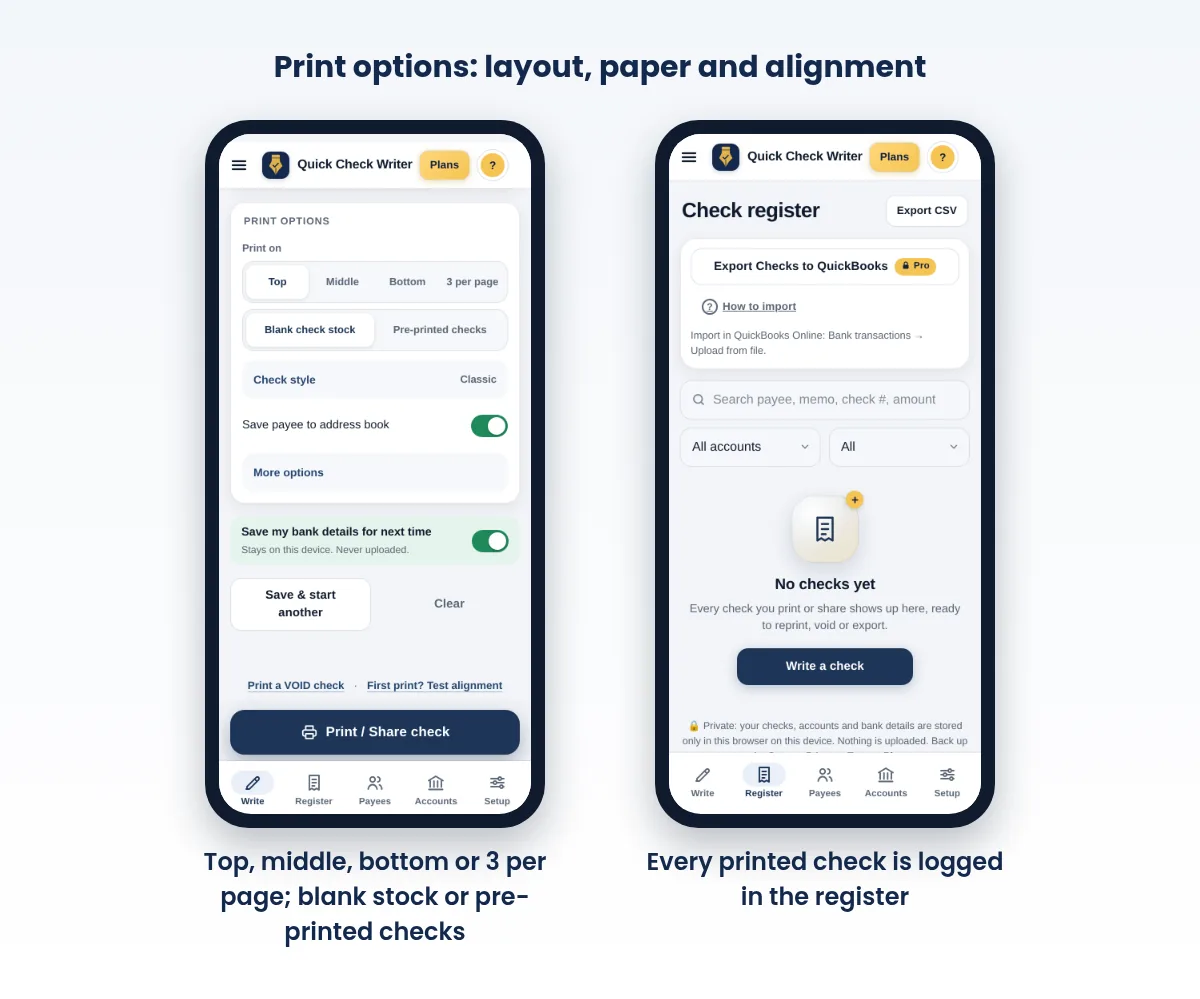
- Open print options
Below the check form, under "Print on", choose Top, Middle, Bottom or 3 per page.
- Pick the check size
Standard for business-size checks, or Wallet (beta) for personal-size checks.
- Choose blank stock or pre-printed checks
On blank stock, the whole check prints, including the MICR line. On checks you already have from a supplier, only the payee, amount, date and memo print into the existing boxes; see software for pre-printed checks.
- For 3 per page, set where to start
If the sheet already has a used position, choose 1, 2 or 3 to print on the next free one.
- Test alignment, then print
Print the alignment test page on plain paper, hold it over your stock against a light, and nudge the X and Y offsets until everything lines up.
Getting the alignment right
Every printer feeds paper slightly differently, so even a correct layout can land a few hundredths of an inch off. That matters most for the MICR line and for pre-printed checks, where text has to fall inside existing boxes. A quick routine:
- Print at 100% scale. In the print dialog, choose Letter paper and Scale 100% (or Default). Never use "Fit to page", which shrinks the check.
- Use default or no margins, and turn off headers and footers so the browser doesn't add a date or web address.
- Test on plain paper first. Hold the test sheet over your stock against a window or lamp.
- Adjust offsets in inches. In Quick Check Writer, a positive X offset moves everything right and a positive Y offset moves it down.
- Check from your phone too if you print from a phone; phone printing can shift slightly compared with a computer.
Still off? Our guide to check printing problems and fixes walks through the usual causes.
What never moves: the bank line at the bottom
Whatever layout you pick, one part of the check is fixed by banking standards rather than by taste. The ANSI X9.100-160-1 standard sets where the magnetic bank line (MICR line) goes, and banks' own check-printing specifications describe a clear band about 5/8 inch tall across the bottom of the check that is reserved for that line. Nothing else should print in that strip: no stub text, no logo, no background design.
That's why layouts are built around the check's bottom edge, not the sheet's. On a check-on-top sheet, the bank line sits about 3 inches down the page; on a check-on-bottom sheet, it sits just above the bottom of the paper. Good software moves the bank line with the check automatically. What you control is that the printed check lands where the perforation expects it, so the torn-off check has the right bottom edge. A check torn a quarter inch too high or low moves the bank line out of place even when the software placed it correctly.
Business checks vs personal checks
Business checks are usually printed full width on a letter sheet, so they're as wide as the paper and about 3.5 inches tall. That extra room holds a logo, a longer payee line, a printed address for window envelopes and, on voucher layouts, the stubs. Personal checks are the smaller checkbook size. Either size is a valid check; banks process both. Choose by how you'll use them:
- Paying vendors, contractors or rent with details attached: a business-size voucher layout.
- Writing lots of checks with no stubs: business-size, 3 per page.
- Personal use, carrying a check in a wallet or using small envelopes: wallet size.
Our guides on printing business checks and printing personal checks go deeper on each.
Layouts with pre-printed checks
If you buy checks that already carry your bank details and MICR line, you're not choosing a layout so much as matching one. Pick the position that matches your pre-printed sheets (top, middle, bottom or three per page), switch to pre-printed mode, and only the variable details print: payee, amount, amount in words, date and memo. Alignment matters even more here, because the text has to land inside boxes that are already on the paper, so print a test on plain paper and adjust offsets before using a real check.
A quick checklist before you buy stock
- Decide on stubs
If payees need invoice details, choose voucher stock. If not, three per page saves money.
- Match the perforation
For voucher stock, pick check on top, middle or bottom, and choose the same layout in your software.
- Check the size
Business-size or personal (wallet) size.
- Check the security features
Look for features like a void pantograph, microprinting or chemical-reactive paper; see check security features.
- Buy a small pack first
Print a few real checks and confirm alignment before ordering in bulk.
Layouts and window envelopes
If you mail checks in window envelopes, turn on the option to print the payee's address, then test-fold a plain-paper copy into your envelope before printing on stock. With a check-on-top voucher, folding in thirds usually puts the check panel at the front. Make sure only the name and address show through the window, not the amount. For everything else about sending checks, see how to mail a check.
Common layout mistakes and how to avoid them
| Mistake | What happens | Fix |
|---|---|---|
| Layout doesn't match the perforation | The tear line runs through the check or the stub | Hold a plain-paper test print over the stock before printing |
| "Fit to page" left on | Everything shrinks a few percent and drifts toward the center | Set scale to 100% (or Default) every time |
| Partly used 3-per-page sheet fed the wrong way | The check prints on a position you already used | Mark the top edge of your stock and set the start position to the next free check |
| Stub layout chosen for payments that need no stub | Two-thirds of every sheet is wasted | Switch to 3 per page for simple payments |
| No stub and no record | Nothing shows why you paid | Use the memo line and keep the check register; export it now and then |
A good habit with any layout: print one real check from a new pack first, tear it off and look at it before printing a batch. If the bank line sits evenly above the bottom edge and nothing is cut off, the rest of the pack will print the same way on that printer.
Frequently asked questions
Which check layout should a small business use?
Check on top with two stubs is a popular choice for paying vendors because the stubs carry invoice details. Three checks per page is cheaper per check when you don't need stubs.
Can I print three checks on one page?
Yes. The 3-per-page layout splits a letter sheet into three checks with no stubs. In Quick Check Writer you can also start on the second or third position to use a partly used sheet.
Does the bank care if the check was on top, middle or bottom?
No. The bank only sees the detached check. What matters is that the check is the right size and the MICR line is in the right place relative to its bottom edge.
What size is a wallet check?
Personal checks are typically about 6 by 2.75 inches. Quick Check Writer's wallet layout (beta) prints three of that size per letter sheet, each with a register stub.
Why does my check print in the wrong place?
Usually the print scale isn't 100%, the margins are changed, or your printer feeds paper slightly off. Print the alignment test page and adjust the X and Y offsets.
Can I use any blank check stock with any layout?
Only if the perforations match. Choose the layout that matches where your stock is perforated, or buy stock made for the layout you want.
How many checks can I print from a pack of check stock?
It depends on the layout. Voucher layouts (check on top, middle or bottom) give one check per sheet, so a 500-sheet pack makes 500 checks. Three-per-page stock gives three checks per sheet, so the same number of sheets makes 1,500.
Which way do I load check stock into my printer?
It depends on the printer. Draw an arrow on a plain sheet, print a test page on it, and see which side and edge came out printed. Then load the check stock the same way, with the check position matching your layout.
Can I switch layouts later?
Yes. The layout is a print setting, not part of your account, so you can print vendor checks on voucher stock and simple checks three per page. Just load the stock that matches the layout you choose.
Related guides
- Check stubs and voucher checks
- Check size and dimensions
- Blank Check Stock: A Complete Guide
- Check printing problems and fixes
- Check writing software for pre-printed checks
- How to print checks at home
Sources
- ANSI Webstore: ANSI X9.100-160-1 Magnetic Ink Printing (MICR) Part 1, Placement and Location
- PNC Bank: Magnetic ink printing specifications for checks (5/8-inch clear band)
Last updated November 1, 2026. This page is general information, not legal or financial advice. Quick Check Writer is check printing software; it is not a bank and does not move money.