
Key takeaways
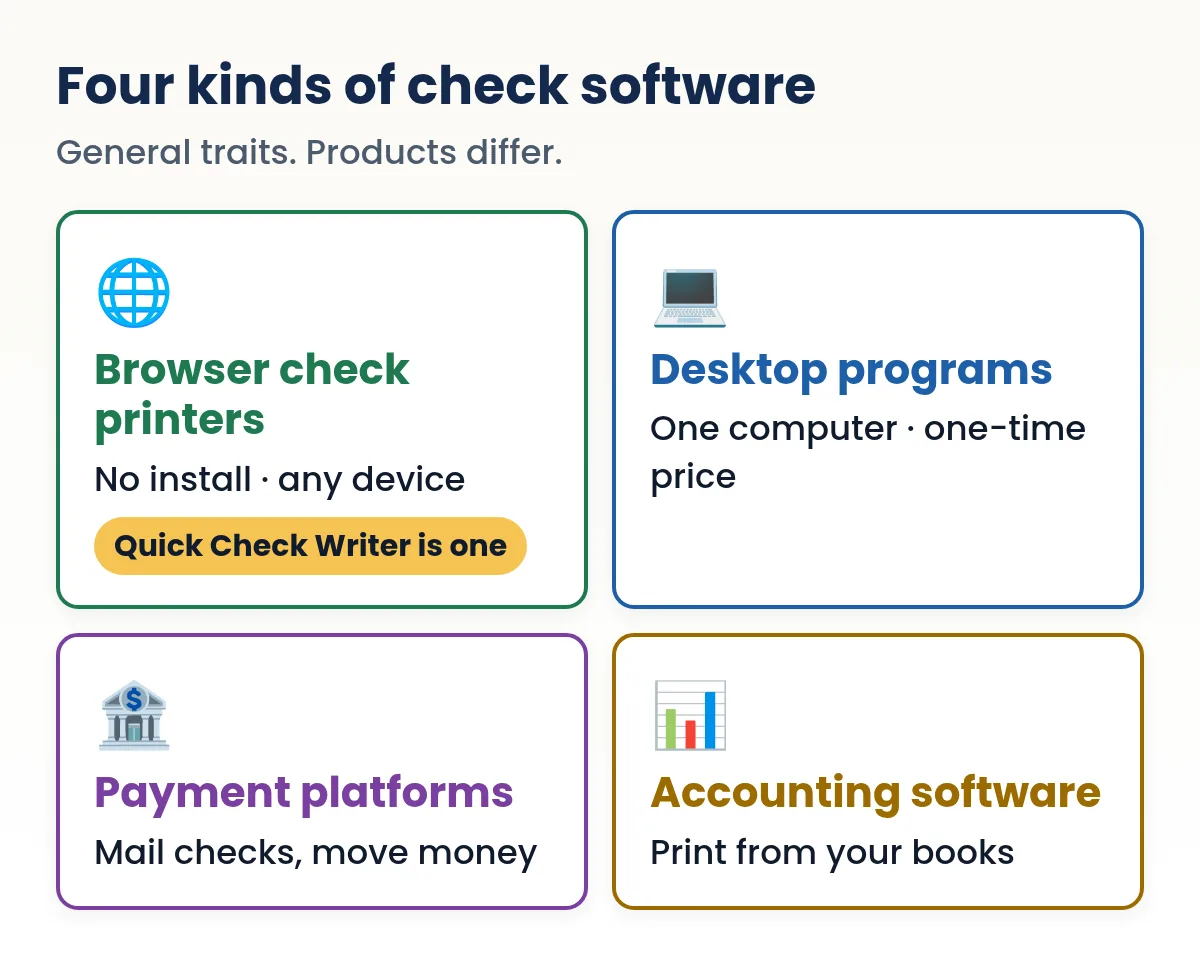
- There are four kinds of check printing software: browser, desktop, payment platform and accounting.
- Quick Check Writer prints checks: blank or pre-printed stock, logo, signature, stubs, register, PDF.
- It does not mail checks, send ACH or eChecks, or do payroll.
- Your bank details stay on your device, and it works offline.
- Your first check is free, no account or card.
On this page
- The four kinds of check printing software
- How the kinds compare
- What Quick Check Writer does, and doesn't do
- Three buyers, three right answers
- Comparing pricing models with one example
- Common mistakes when choosing check software
- Who Quick Check Writer is for
- Who should pick something else
- Switching from another check tool
- A note on privacy and where data lives
- Things to compare in any check printing software
- Trying it takes a minute
- FAQ
The four kinds of check printing software
Most products that print checks fall into one of four groups. Knowing which group fits you narrows the choice faster than comparing feature lists.
- Browser check printers
- You open a website or web app, fill in a check and print it on blank check stock. Nothing to install, and they typically work on phones too. Quick Check Writer is in this group.
- Desktop check programs
- Installed on one computer, often for a one-time price, and some run only on Windows. They often include a layout designer and features like bulk imports, payroll checks and deposit slips.
- Payment platforms
- Online services that print checks but also mail them for you, send eChecks and ACH payments, and add approvals and multiple users. They hold your bank details on their servers and usually charge per payment or a larger monthly fee.
- Accounting software check printing
- If you already enter bills in accounting software, it can print checks for them. It's convenient for bookkeepers, but you need the accounting subscription and paper that matches its layouts.
And there's always the non-software option: order a box of checks and write them by hand.
How the kinds compare
| Kind | Typical pricing | Best for |
|---|---|---|
| Browser check printer | Monthly or yearly plan | Printing your own checks on any device, simply |
| Desktop program | One-time license, paid upgrades | One office computer, heavy layout customizing |
| Payment platform | Per payment and/or monthly | Mailing checks and moving money for you, teams |
| Accounting software | Accounting subscription | Bookkeepers who enter every bill there |
Two more differences matter in practice. Where your bank details live: payment platforms and accounting software keep them on their servers, desktop programs on your computer, and Quick Check Writer in the browser on your device. Phones: browser tools and many platforms work on a phone; desktop programs generally don't.
These are general traits of each kind, not a review of any specific product. Prices and features change, so check the product's own pages before you buy.
What Quick Check Writer does, and doesn't do
Here's our own feature list, without spin. If something you need is in the "No" rows, one of the other kinds of software is a better fit, and that's fine.
| Feature | Quick Check Writer | Notes |
|---|---|---|
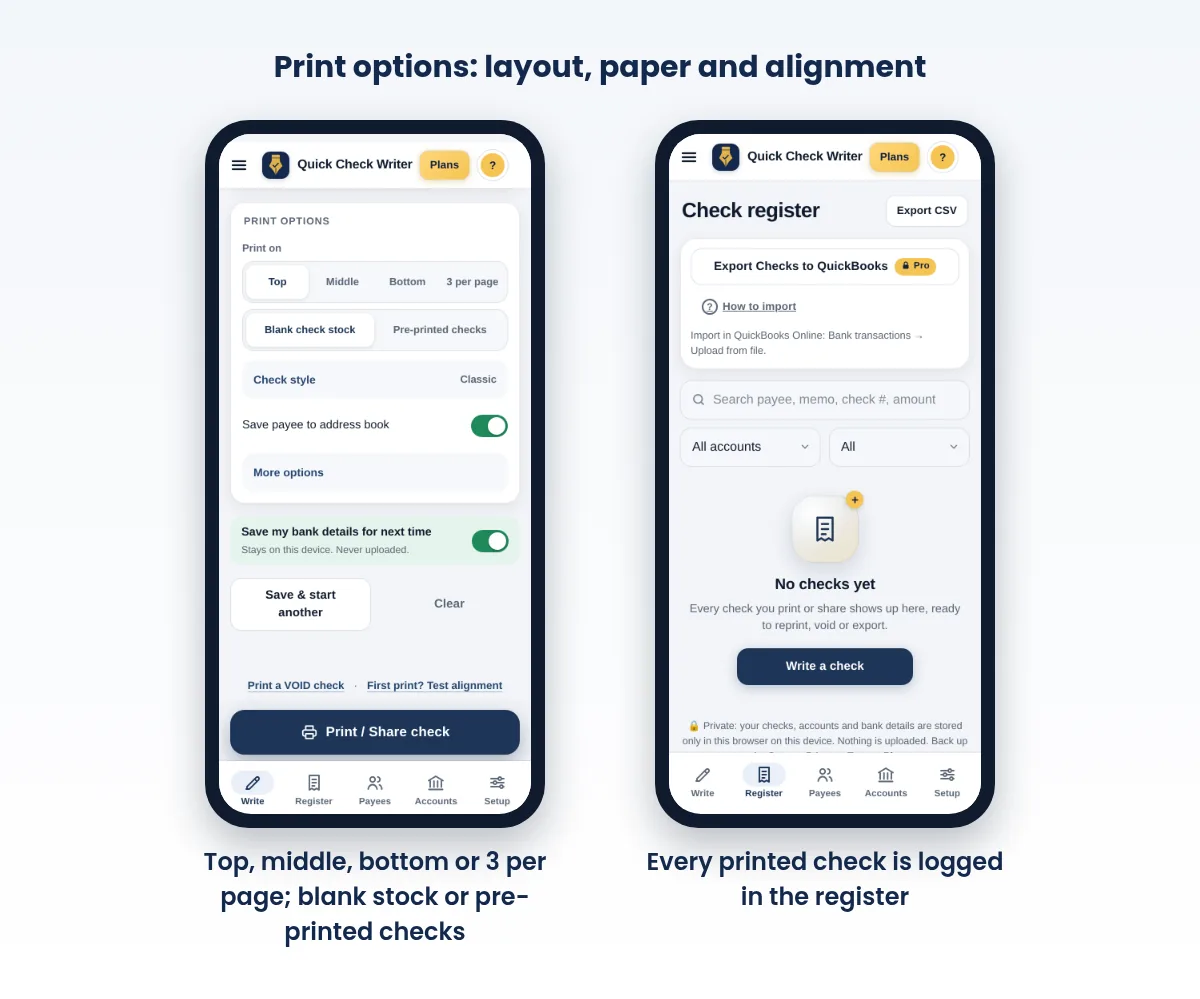
| Print checks on blank check stock with the bank line (E-13B) | Yes | |
| Print onto pre-printed checks you already have | Yes | Pre-printed checks mode |
| Layouts: top, middle, bottom, 3 per page | Yes | Wallet size in beta |
| Voucher stubs with notes and an invoice photo | Yes | |
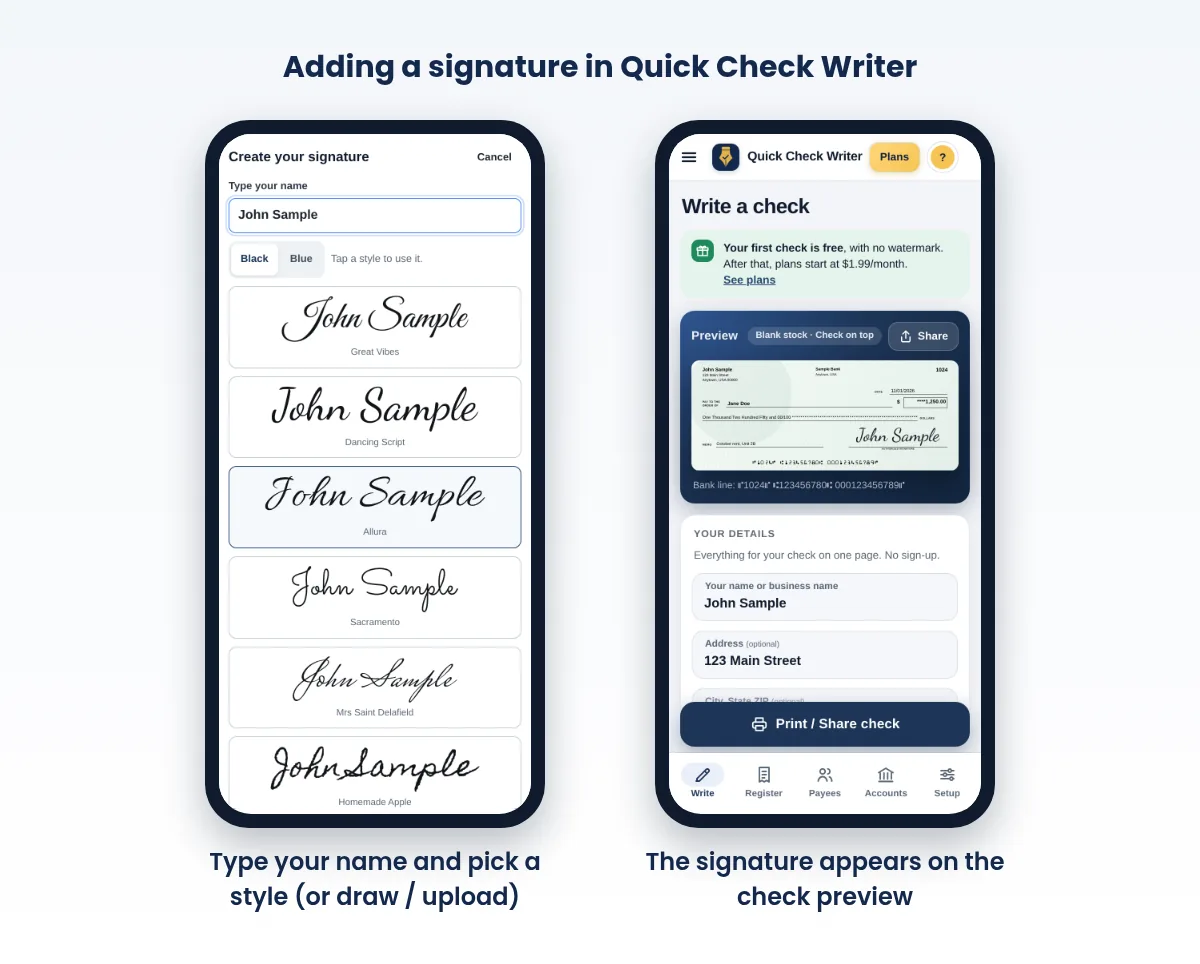
| Logo and signature (draw, upload or type) | Yes | |
| Check styles and security backgrounds | Yes | Extra styles on Pro |
| Amount in words filled in automatically | Yes | |
| Saved payees with addresses | Yes | |
| Several bank accounts | Yes | Up to 10 on Pro |
| Check register: search, reprint, void, CSV export | Yes | |
| QuickBooks export file (Online CSV, Desktop .IIF) | Yes | Pro |
| Batch print saved checks | Yes | |
| Share or download a check as PDF | Yes | Built on your device |
| Works offline after the first visit | Yes | |
| Bank details stay on your device | Yes | Not uploaded |
| Phone, tablet and computer | Yes | In the browser; Android app coming soon |
| Mail checks for you | No | Print, then mail it yourself |
| ACH, eChecks, wires or any money movement | No | Use your bank |
| Payroll, pay stubs or tax forms | No | |
| Bank account verification | No | |
| Positive Pay files or deposit slips | No | |
| Live sync with accounting software | No | Export files instead |
| Bulk import from a spreadsheet | No | |
| Recurring checks or approval workflows | No | Single user |
| Drag-and-drop layout designer | No | X/Y offsets to align |
| Canadian or UK cheques | No | US checks only |
Current prices are on our pricing page. Your first check is free, with no watermark, no account and no card, and every paid plan prints unlimited checks.
Need to write a check right now?
Quick Check Writer fills in the amount in words, adds the bank line and prints on blank check stock or saves a PDF. Your first check is free, with no account and no card.
Write your first check free →Three buyers, three right answers
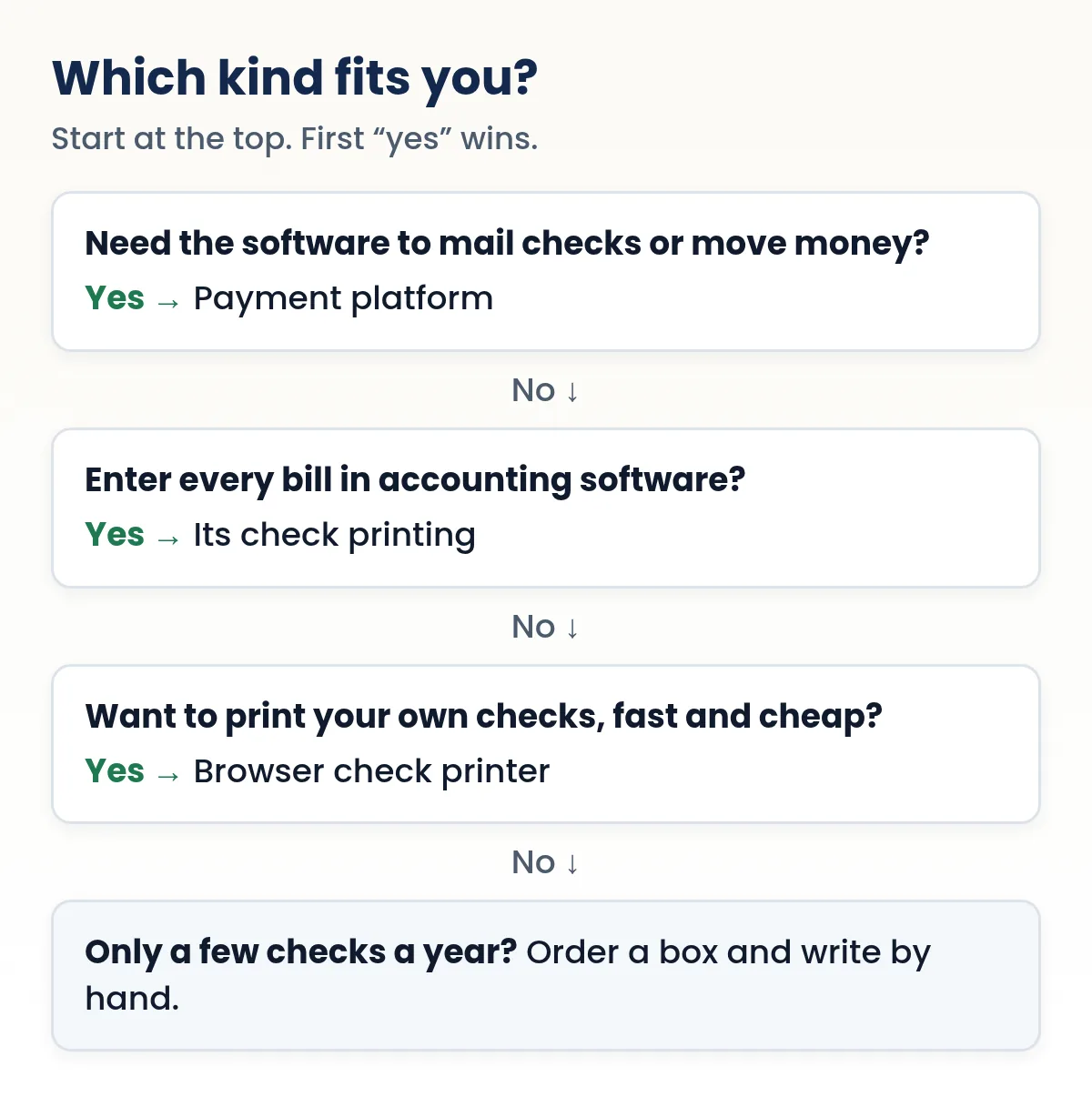
John Sample keeps a separate bank account for each of four rental properties and pays repairs, taxes and utilities by check, 20 to 30 a month. He doesn't need anyone else to approve payments, and he wants each property's checks to show its own name and address. A browser check printer fits: one pack of blank voucher stock, each property set up as its own bank account (up to 10 on our Pro plan), stubs for invoice numbers, and a register he can export for his accountant.
An office manager prepares checks; the owner has to approve each one before it goes out; the accountant wants a log of who did what. That's an approval workflow with users and roles, which Quick Check Writer doesn't have. A payment platform or accounting software built for teams is the right kind here.
Jane Doe enters every bill in her accounting software as it arrives. Printing checks from there marks the bills paid in the same step. Her accounting software's own check printing is the natural choice. A separate check printer would mean entering each payment twice; our QuickBooks export helps only if the checks start in Quick Check Writer.
Comparing pricing models with one example
Check software is sold three ways: a one-time license, a monthly or yearly plan, or a fee per check. They're hard to compare until you turn each into a cost per check at your volume. A worked example with round, made-up prices, for someone writing 10 checks a month:
| Pricing model (example price) | Math | Per check |
|---|---|---|
| One-time license, $60, used for 3 years | $60 ÷ 360 checks | about 17¢ |
| Monthly plan, $1.99 | $1.99 ÷ 10 checks | about 20¢ |
| Fee per check, $1.00 | $1.00 × 1 | $1.00 |
Paper and toner come on top of each row. Run your own numbers: a license looks cheaper the longer you keep it, but paid upgrades and a new computer can reset the clock; a per-check fee is fair for a handful of checks and expensive for a stack; a low monthly plan sits in between and stops when you cancel. Our pricing page has our real prices.
Common mistakes when choosing check software
- Buying for features you won't use. Mailing, approvals and payroll are valuable if you need them and expensive if you don't.
- Ignoring your computer. A Windows-only program doesn't help on a Mac or a phone. Check the devices before you check the features.
- Skipping the test check. Print one on plain paper and compare the bank line with a check from your bank before you commit.
- No exit plan. Find out how to export your records if you stop paying or switch tools.
- Spreading your account number around. Each service that stores your bank details is one more place it can leak. Use only the ones you need.
Who Quick Check Writer is for
- People who write a few checks a month for rent, contractors, tuition or a babysitter and are tired of handwriting them or waiting for a box.
- Small businesses and landlords paying vendors by check from one or a few accounts, who want voucher stubs, a logo and a clean register they can export.
- Anyone who wants their bank details kept off other people's servers. Your bank numbers, payees and check history stay on your device.
- People on the go who want to write a check on a phone and print it, or save it as a PDF and print later.
Who should pick something else
- You want the software to mail checks for you. A payment platform does this. With Quick Check Writer you print the check and mail it yourself (see how to mail a check).
- You need ACH, direct deposit or payroll. Use your bank, a payroll provider or a payment platform.
- Several people need to approve payments with roles and an audit trail. Look at payment platforms or accounting software built for teams.
- You print hundreds of checks from a spreadsheet every month. A desktop program or platform with bulk import will save time.
- You need Canadian or UK cheques. Quick Check Writer prints US checks.
Switching from another check tool
If you already print checks with other software, moving over takes a few minutes. Quick Check Writer can't import checks from other software, so keep your old records where they are (or export them) and start fresh from your next check number.
- Add your bank account
Enter the account holder name and address, bank name, routing number and account number. Copy the numbers from an existing check and compare digit by digit.
- Set the next check number
Start one above the last check your old software printed, so numbers never repeat in your bank's records.
- Match your paper
Pick the layout that matches the blank stock you already have: top, middle, bottom or three per page. Pre-printed checks from your bank work too, with the pre-printed checks mode.
- Run the alignment test
Print on plain paper, hold it over your stock against a light and adjust the X/Y offsets until it lines up.
- Add the extras
Your logo, a signature and saved payees. Then print your first real check and compare its bank line with one from your old software.
A note on privacy and where data lives
Every check shows your routing and account number to the person you pay; that's how checks work. The question is how many other places keep a copy. Software that runs on servers stores your bank details there so it can sync, mail checks and add team features. Quick Check Writer takes the other approach: bank numbers, payees and your check history stay in your browser on your device, and you can export a backup file whenever you like. The trade-off is that there's no automatic sync between devices, so use the backup to move to a new phone or computer.
Things to compare in any check printing software
- The total cost at your volume
Convert one-time prices, monthly plans and per-check fees into cost per check for the number of checks you actually write. See what it costs to print your own checks.
- Where your bank details are stored
On your device, on your computer or on a provider's servers. Each has trade-offs: servers allow syncing and team features, local storage keeps fewer copies of your account number in the world.
- The bank line
The software should print the routing, account and check number in the E-13B font in the standard position. Print a test check and compare it with a check from your bank. Our MICR font guide shows what to look for.
- Paper and printer
Does it print on blank stock, pre-printed checks or both? Does it work with the printer you have? See the best printer for checks.
- Devices
Windows only, Mac, phone, or anything with a browser?
- Records and exports
A searchable register, CSV export and accounting file formats save time at tax time.
- What happens when you stop paying
Can you still open your records? Quick Check Writer keeps your data on your device and lets you export a backup at any time.
Trying it takes a minute
The fastest way to compare is to print a test check. With Quick Check Writer you can write and print your first check free, without creating an account. Print it on plain paper first to check alignment, then on check stock. If it isn't right for you, you've lost a sheet of paper.
Related comparisons: alternatives compared: the 3 kinds of check tools, free check printing software, check printing software for Windows and a QuickBooks check printing alternative.
Frequently asked questions
What is the difference between check printing software and a payment platform?
Check printing software prints checks you then hand over or mail. A payment platform can also mail checks for you and move money electronically, usually with per-payment fees and your bank details stored on its servers.
Does Quick Check Writer mail checks?
No. It prints the check or saves it as a PDF. You mail or hand over the check yourself.
Can Quick Check Writer send ACH payments or eChecks?
No. It doesn't move money. You can share a check as a PDF that the payee prints and deposits, but that is still a paper check.
Does Quick Check Writer work with QuickBooks?
On the Pro plan it exports your check register in formats QuickBooks can import: a CSV for QuickBooks Online and an .IIF file for QuickBooks Desktop. It doesn't sync live.
Do I need to install anything?
No. It runs in your browser on a phone, tablet or computer and keeps working offline after your first visit.
Where are my bank details stored?
On your device. Bank numbers, payees and check history are not uploaded. You sign in only for your plan, and you can export a backup any time.
Is there a free version?
Your first check is free with no watermark, no account and no card. After that, printed checks show a SAMPLE mark until you subscribe. All paid plans include unlimited checks.
What is the best check printing software for a small business?
It depends on what the business needs. To print your own checks on blank stock from any device at low cost, a browser check printer fits. For mailing checks, ACH or approvals, a payment platform fits. If every bill is already in accounting software, its check printing fits.
Does Quick Check Writer work on a Mac?
Yes. It runs in the browser, so it works on a Mac, a Windows PC, a Chromebook, an iPhone or an Android phone, with nothing to install.
Is it safe to use online check printing software?
It can be. Ask where your bank details are stored and who can see them. Quick Check Writer keeps bank numbers, payees and check history on your device rather than on a server, and the printed check shows only what any check shows.
Related guides
- Online check writer alternatives: the 3 kinds compared
- Free check printing software: what you actually get
- Check printing software for Windows PC
- QuickBooks Check Printing Alternative: Printing on Blank Stock
- Simple Check Printing Software
- How much does it cost to print your own checks?
Sources
Last updated November 1, 2026. This page is general information, not legal or financial advice. Quick Check Writer is check printing software; it is not a bank and does not move money.